

One company on your site, your ads and every article, set once and followed by every piece.
Our team builds the positioning, the identity and the voice. Then it is set in your dashboard: your logo and name in the header, your voice and tone in Settings, your palette and image style in the brand kit file that every generated featured image reads. The content engine writes in it on your cadence whether anyone is at a desk, and a change to the voice is one logged request, followed by every piece after it.
What does brand work change for my business?
Your customer meets you in more places than you visit: a search result, an article published last month, an ad in a feed, an estimate, the side of a truck. The outcome you are buying is one company across all of them, the same name, mark and way of speaking, so the person who saw the ad recognises the estimate.
Most businesses have a single-source problem, not a taste problem. The rules live in one head or in a PDF nobody opens, so each new contributor and each new tool reinvents the brand from memory.
Our brand work fixes that at the root with four deliverables. Positioning: a read of your market and competitors, the customer you want, the promise, and one positioning statement your whole team tells the same way. Identity: a logo suite, a colour system, typography, imagery direction, and templates for decks, social, ads, email and web. Messaging: the core narrative, value propositions, taglines and boilerplate, a tone of voice that flexes by channel, and the words to use and avoid. The kit: a guidelines document with what to do and what to avoid, ready-to-use assets and templates, and written guardrails for generative tools so generated work comes out on brand.
It is written for a service business, one territory or several locations: the business that gains when the brand is written down once and installed where the engines read it. A business with its own marketing hire gets the same four deliverables and the same engines.
Four deliverables
Positioning
- A read of your market and competitors
- The customer you want and the promise
- One positioning statement
Identity
- A logo suite and a colour system
- Typography and imagery direction
- Templates for decks, social, ads, email and web
Messaging
- The core narrative and taglines
- A tone that flexes by channel
- Words to use and avoid
The kit
- Guidelines: what to do and avoid
- Ready-to-use assets
- Guardrails for generative tools
Most businesses have a single-source problem, not a taste problem.
Where does my brand live on TruLata?
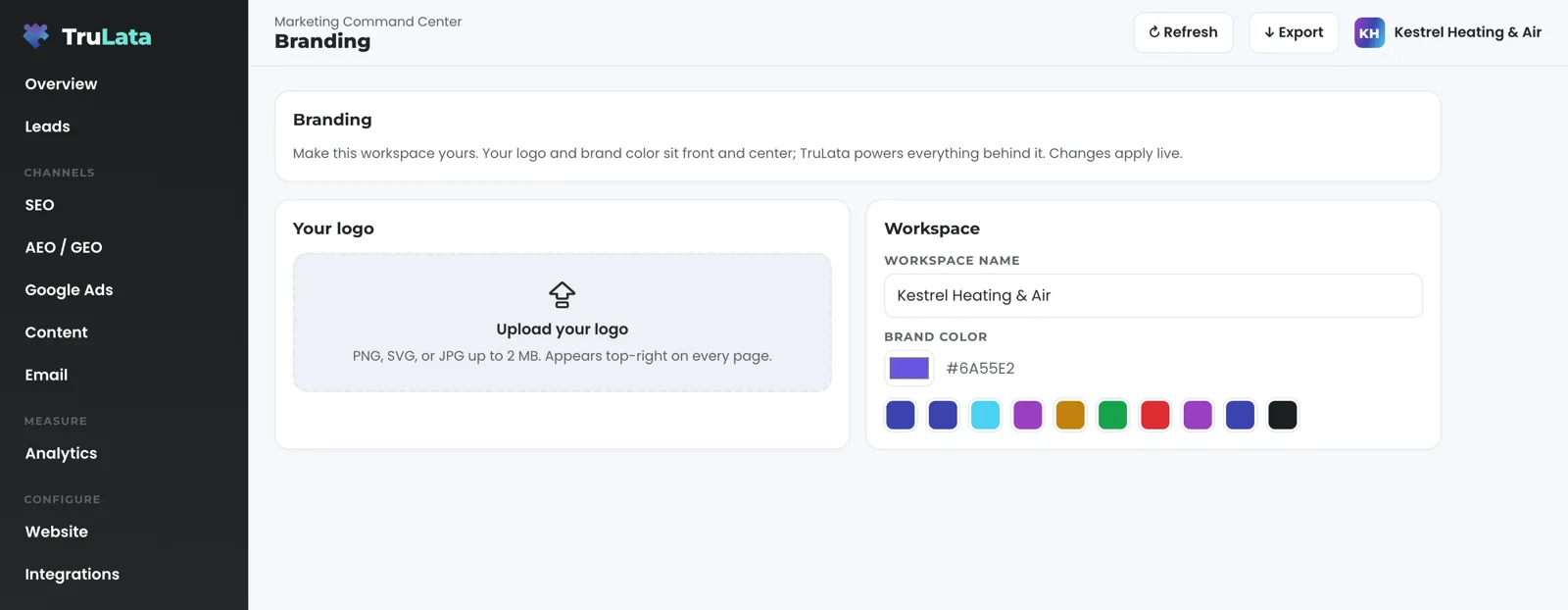
In three places, each with one job. The Branding view, under Account, holds the logo and workspace name that sit in the header of every page your team opens, and a brand colour. Upload a PNG, SVG or JPG up to 2 MB and the header updates the moment the file loads. Our team sets the default for every seat at setup; a change from the view is kept in the browser you made it from, and Reset to default clears that copy, so the setup logo, name and colour are back the next time the page loads. The colour is yours in the header; buttons, badges and charts keep the product palette on every account, so you are identified by your name and your mark. The Branding view page covers it control by control.
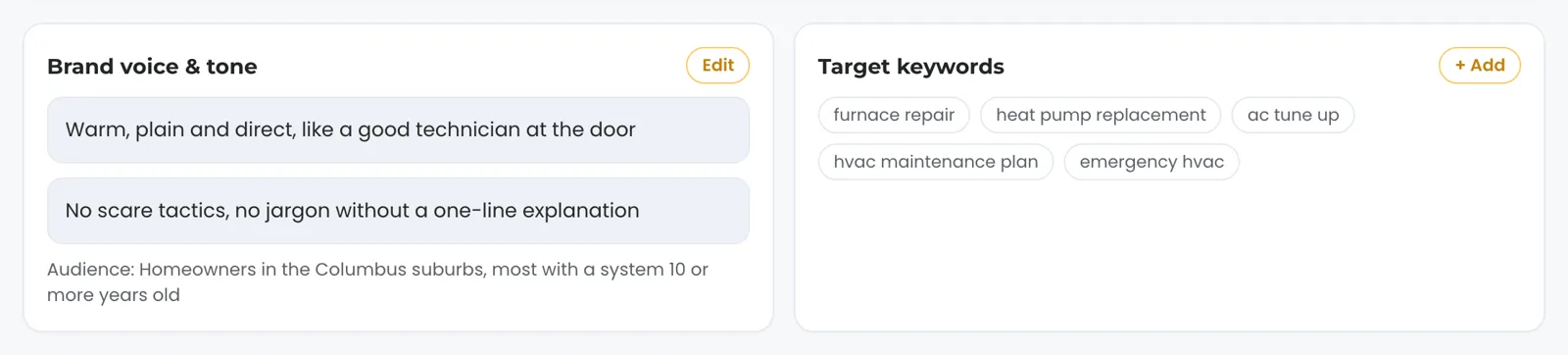
The Settings view, under Configure, holds the voice. A Brand voice and tone card shows the voice set with you and your audience under it, beside your target keywords, your cadence and the channels enabled. Press Edit, describe the change, and it goes to the team with a ticket number, logged. A person makes the change on our side, and every piece written after it follows the new tone. Your photographs have a place too: the Website view carries photo folders to drop new images into.
Behind the screen sits your brand kit file: palette, typography and a written image style, kept by our team as the one source a generated featured image reads. A business with no brand file yet gets a neutral style of its own until our team builds the file, and brand work from our team lands in the same file, so the palette you approved is the palette on the next featured image. The three set what the engines write in; the pieces themselves reach your site and your ads through the content engine and the creative sets, and your customer meets the brand there, on your own properties.
Which engines write in my voice, and what still needs a person?
The content engine, on Launch, Growth and Command, writes every piece with your tone in front of the writer, and it names your business and the area it serves in a plain sentence early in the piece. Each topic passes a demand gate on real search volume, and the research step cites current sources. The finished piece is filed as a Google Doc in your Drive with its featured image beside it: a real photograph vetted for the piece, with no text, watermark or logo, or an image generated in your brand's image style where stock falls short of the topic. Auto-publish is a setting per account; with it off, the piece waits in your Drive awaiting approval. The content engine page walks through the stages.
Social media management is on Command. Our team builds each set, the copy you read on the Creative view is the copy rendered into the image, and an ad appears on the view once a person on our side has opened every rendered image and written down what it shows, and that note is checked against the copy. Press Approve or Request changes and the decision is recorded against the ad. The outbound engine, on Command, sources prospects weekly to the target profile set with you and drafts each opener into a review-first queue. The creative page and the outbound page cover both.
What runs on a schedule: content on your cadence, prospect sourcing weekly, the ads change watch at 7:05am Eastern, the fallback snapshot at 12:01am Central. What stays with a person: the positioning, the mark and a change to the voice. Money and replies run within limits and leave a record. A budget or bid change in your ads account is made within the limits set for your engagement and lands in your account's own change history. Prospect emails leave from a review-first queue; a person releases them, or the queue releases on the schedule set for the engagement, and every send is logged with the draft, the mailbox and the time.
Set once, followed by every piece
- Voice and tone, in Settings
- Palette and image style, in the brand kit file
- Logo and name, in the Branding view
- Articles in your voice, on your cadence
- Featured images in your image style
- Ad creatives, approved or sent back by you
A change to the voice is one logged request, followed by every piece after it.
Can I see how the brand shows up before I talk to anyone?
Yes. Open the demo at demo.trulata.com. It opens with your name and email, runs on a fictional company called Meridian with illustrative numbers, and is the same engine code every client dashboard runs. Go to Branding under Account and upload any PNG, SVG or JPG under 2 MB. The header changes while you are still on the view, and the live preview shows your mark, the workspace name and a Powered by TruLata label.
Then open Settings under Configure and read the Brand voice and tone card, the audience, the keywords and the cadence. That tone is what the writer is handed on every piece. Open the Content view next for the pipeline counts, which is what your own screen shows later in setup, when the content cadence starts.
Read the search view with one idea in mind: ranking is not earning. The view sets the leads your own forms counted beside your positions, and a position there is Search Console's average for the query rather than a rank tracker's guess. A page that is found still has to be chosen, and whether the branded pages earn shows in the search view from Search Console, 2 to 3 days behind, and in the analytics view from GA4, hours behind intraday.
Which tier carries the brand work?
Starter includes the TruLata dashboard, full analytics, leads, search visibility, the AI visibility program, managed Google Ads search, the assistant and briefings and support tickets. The content engine, which writes in the voice set with you, runs on Launch, Growth and Command. Google Ads search is managed on all tiers. Meta ads are managed on Growth and Command. The outbound engine runs on Command. Command adds the outbound engine, social media management and your full marketing team, always on, is scoped per engagement and carries no number on this site.
Seats are three on Starter, three on Launch, ten on Growth and unlimited on Command. Starter is $400 a month, Launch $650, Growth $1,200, and Command is scoped per engagement. Every tier is one flat number, month to month, and an annual commitment takes twenty percent off the monthly. The pricing page carries the same figures as every other page on this site.
The published tiers
- Starter is $400 a month, Launch $650, Growth $1,200, and Command is scoped per engagement
- The content engine, writing in your voice, on Launch, Growth and Command
- Month to month; annual takes twenty percent off
Command
- Adds the outbound engine, social media management and your full marketing team, always on
- Scoped per engagement
- No number on this site
Can your team run the brand for me after it is built?
Yes, two ways. Command adds the outbound engine, social media management and your full marketing team, always on, scoped per engagement: our team runs the program, including social media posts created and published for your approval. The managed strategy retainer sits on top of any tier, scoped with you, and puts strategy, optimization and the approvals on our side: approving a content piece, releasing a prospect send where the engagement is set to review, deciding what the brand does next. Neither carries a number on this site. The managed page covers both; the pricing page shows where Command sits above the published tiers.
Without either, the judgment is yours and the record is the same: your team approves content or asks us to set the engagement to auto-publish, asks for a voice change from Settings, and every request is logged with a ticket number. The brand work is also sold on its own, scoped in writing before it starts. Write to us from the contact page, or start from the services hub, where content creation, website design and development and digital marketing put the brand to work.

Where each part of the brand lives.
| What | Where it lives | How it changes |
|---|---|---|
| Logo and workspace name | Branding view, under Account; PNG, SVG or JPG up to 2 MB | In the header at once on that browser; the default for every seat is set by our team at setup |
| Brand colour | Branding view; a swatch or your own hex | Kept in your browser and shown in the view's preview |
| Voice and tone, audience | Settings view, under Configure | Edit sends a logged request with a ticket number; every piece after it follows the change |
| Palette, typography, image style | Your brand kit file, kept by our team | Read by every featured image generated for an article |
| Target keywords and cadence | Keywords on the Settings view; cadence from Schedule on the Content view | Each is a logged request to the team; the content engine aims at them |
| Ad creatives | Creative view, on Command | The copy you read is the copy rendered into the image; your decision is recorded against each ad |
| Whether the branded pages earn | Search view and analytics view | Search Console 2 to 3 days behind; GA4 hours behind intraday |
A person designs the logo, chooses the positioning and reworks your website; the engines write in the brand that person set. The Branding view changes the header your team sees, and your customer meets the brand on your site, your ads and every article. A change to your site, your ads, your CRM or your Business Profile is a logged request or an engine write through that platform's own API.
Questions, answered.
Do I need TruLata to hire you for brand work?
TruLata sells brand strategy, identity, messaging and the kit as a service on its own, scoped in writing before it starts. On TruLata the same work is installed where the engines read it: the logo and name in the header, the voice in Settings, the palette and image style in your brand kit file.
Can I change the logo or the voice myself?
The logo, workspace name and colour, yes, from the Branding view, on the browser you change them from; to change the default for every seat, send us the file with a support ticket. The voice is changed with Edit on the Settings view, which sends a logged request to the team with a ticket number, and every piece written after it follows the change.
Does the brand colour change my website or my ads?
It is kept in the browser you set it from and shown in the view's preview, beside your mark in the header. The palette for your site, your ads and every generated image is the one in your brand kit file, built by our team, and a change there is a logged request.
Will the content engine write in my voice from the first piece?
Yes. The writer is given your tone on every piece, and a generated featured image takes its style from your brand kit file. Setup puts both in place: access during setup, baselines and the keyword set early in setup, and the content cadence later in setup.
Can you refresh an existing brand instead of starting over?
Yes. We audit what is working, keep the equity your customers already recognise, and rebuild only what is holding the brand back. The refreshed palette, voice and image style then replace the old ones in your brand kit file and in Settings, so the next piece carries them.
Which tier is the brand work on?
The Branding view is part of TruLata itself, and Starter includes the TruLata dashboard, full analytics, leads, search visibility, the AI visibility program, managed Google Ads search, the assistant and briefings and support tickets. The content engine, which writes in your voice, runs on Launch, Growth and Command, and social media management is on Command. Our team's positioning, identity and kit work is sold as a service on its own, scoped in writing before it starts, and installed on whichever tier you hold.
See how it would run
for your business.
15 minutes with TruLata. We show you what your marketing brings in, what each lead costs, and what we would change first.
Book a demo or start a 7-day free trial
No card. It ends on its own after 7 days unless you add one. See pricing.
New here? See what TruLata is. Prefer to write? Send us the one thing you want to know.
Start here: AI marketing platform · AI marketing software · all-in-one marketing platform · marketing automation software · marketing software for small business.
- Refreshed when you open itLive data on page load, never a monthly PDF
- Counted from your own formsLeads recorded server-side, compared daily with Ads and GA4
- Seen in AI answersHow often ChatGPT, Gemini, Claude and Grok name you, measured
- Every send loggedProspect emails leave from a review-first queue, and every send is logged.