

Get leads you can count from paid search, and read every change in your own account.
Our team runs your Google Ads search campaigns, and your Meta ads on Growth and Command. TruLata is where you read them: spend and cost per conversion beside the leads your own forms recorded, and every change in your account's own change history.

What do I get from paid search that I am not getting now?
Leads you can count, and a record of who did what to get them. Where your website forms feed the lead sheet, each submission is appended to that sheet server-side and emailed to your team as it lands, and the Leads view reads the sheet newest first. Google's conversion count sits on the ads view beside it, so what Google says your spend bought and what your own forms recorded are one click apart, and where your forms feed the sheet a daily check raises it when leads land and Ads or GA4 recorded none.
Budgets and bids move within limits set with you. Budgets and bids in your ad account are changed by our team within the limits set for your engagement, and each change lands in your Google Ads account's own change history. You read it in your own console for as long as Google keeps it. The same morning watch sets our own writes aside and raises a material change made by anyone else to the team the same day, a recommendation Google applies on its own included.
The work is the work a paid-search team does: the keyword set, the campaign structure, the negatives, the copy, the bids and the budgets. What changes is where it reports: into the ads view of TruLata, on a screen you open, next to your leads, your search and your revenue. It is built for a business that sells a service, usually inside a territory, whether the owner runs the marketing or a marketer does. The campaigns and the daily checks run whether or not anyone had time, and one screen shows what the campaigns spent and what came back.
- A form is submittedAppended to the lead sheet server-side and emailed to your team as it lands
- Read on the Leads viewNewest first
- Set beside Google's countThe ads view carries Google's conversions, one click away
- Checked every dayRaised when leads land and Ads or GA4 recorded none

Leads you can count, and a record of who did what to get them.
What does TruLata show me about my ads?
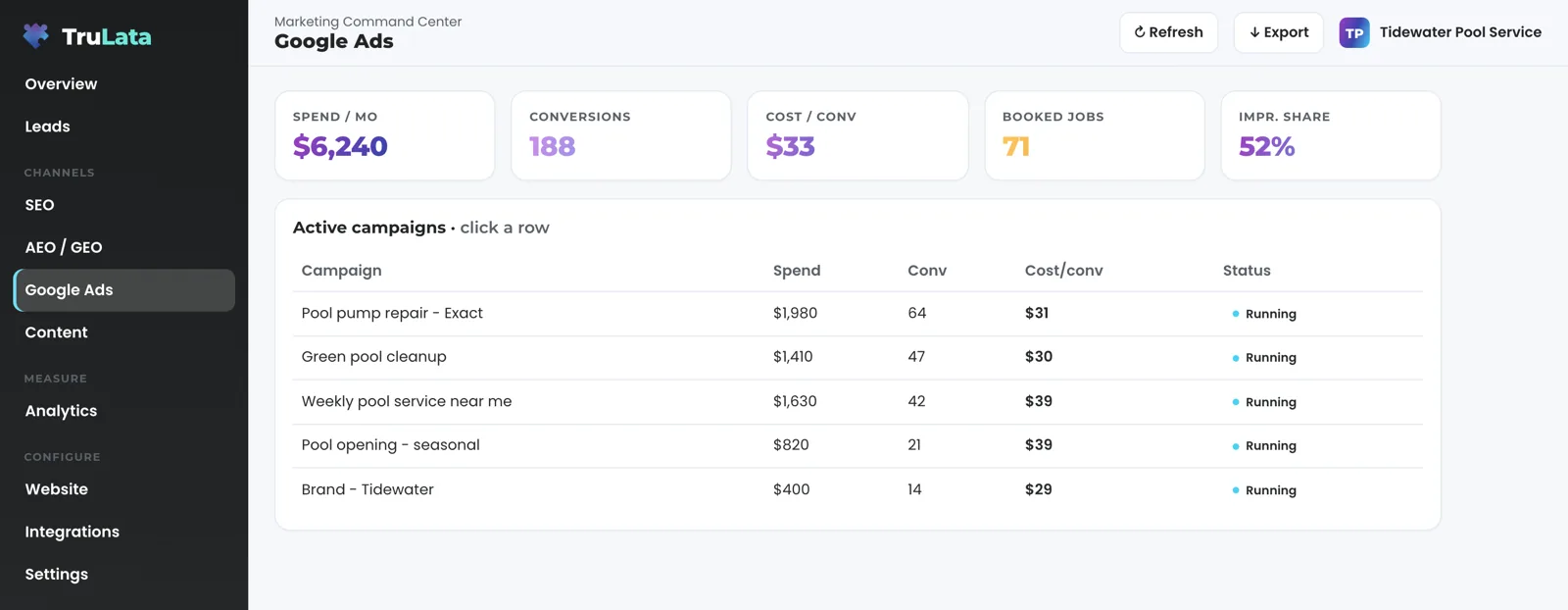
Open the ads view and read one row per campaign: spend, conversions, cost per conversion and status, with the account totals in a stat row above. Click a campaign and it opens with its spend, conversions, cost per conversion, bid strategy and status. With the date-range picker on for your instance, the view reads live from Google Ads for the window you pick, calculates cost per conversion, click-through rate and cost per click from the totals of that window, and sets each beside the window before.
Freshness is set by Google, not by us. Google publishes Ads performance hours after the fact, so the view shows the newest point Google has released and the header stamp says how old it is. On the same dashboard your CRM, Stripe, your booking platform, website leads and email statistics are live, GA4 lags hours intraday, and Search Console runs two to three days behind. The page loads last night's snapshot first, pulls live numbers behind it when that snapshot is older than five minutes, and every press of Refresh ends in a reloaded page with a fresh stamp.
The rest of the funnel is one tab over. GA4 sessions, sources, pages and key events sit on the analytics view, Search Console queries, clicks and average positions on the search view, and jobs read live on the Jobs view where your business runs on a CRM or booking platform. Meta page and social metrics appear where the account is connected, on Meta's schedule, and spend and results from your Meta ad account join the dashboard as that view is built.
What runs on a schedule, and what waits for a person?
Every morning at 7:05 Eastern, a watch reads your Google Ads account's change history and its user list. It reads the user list directly because Google's change events do not log who was given access. It filters our own writes and routine noise first, then raises what is material. What is material reaches the team the same morning it appears.
Material means anything that moves money or access: a budget, a bid strategy, a targeting setting, a recommendation Google applies on its own, or a new user on the account. Each one is raised with the account it belongs to, the campaign it touched and the login that made it. So a setting switched on under any login is read the next morning rather than at the end of the month, and an address given access is caught from the user list the same way.
Two more jobs run whether anyone is at a desk. Where your forms feed the lead sheet, a lead watch at 7:20 Eastern runs five checks, loader, blind, ads blind, stalled and silent, across the sheet, GA4 and Ads. It sets the leads that actually landed against the conversions Google counted, so a dead tag, a blind ad account or a stalled form is flagged the next day rather than at the end of the quarter. And a daily job sets the location option to presence on every campaign in every account under our manager account, so your ads serve to people physically in the area you target; it touches that one setting only.
What stays within limits is anything that spends money: a budget, a bid strategy, a negative, a new ad. The engine builds campaigns and creatives and publishes them through the platforms' APIs, with approval on the Creative view where you want it, and budgets and bids move within the limits set for your engagement, every change in your account's own change history. A request from the screen goes to your team as a logged ticket, and a keyword, category or targeting request is logged the same way and carried out by a person.
What the 7:05am watch raises
- A budget
- A bid strategy
- A targeting setting
- A recommendation Google applied on its own
- A new user on the account
- Our own writes set aside first
- Raised the same morning
- With the account, the campaign and the login
Material means anything that moves money or access.
Can I see it before I talk to anyone?
Yes. Open the demo at demo.trulata.com. It opens with your name and email. It runs on a fictional company called Meridian, every number in it is illustrative, and it is the same engine code every client dashboard runs. Click the Google Ads view, click a campaign row, and confirm it opens with spend, conversions, cost per conversion, bid strategy and status. Then open the Leads view beside it.
One setting decides where your ads actually serve. Targeting a country is two settings in Google Ads: the location list and the location option. Google's default option also serves to anyone Google decides is interested in the location, which spends your budget on clicks from outside the territory you sell in. Your campaigns run on presence instead, so your ads reach people physically in the area you target. The daily job above holds that setting on every campaign in every account under our manager account.
That is the point of running paid search inside TruLata: cost per conversion sits beside the leads your forms recorded, the change history is yours to read, and the checks run every morning. Proving which dollar made the phone ring starts from your own records rather than a platform's report.
Google's default location option
- Also serves to anyone Google decides is interested in the location
- Spends budget on clicks from outside the territory you sell in
Presence, held daily
- Serves to people physically in the area you target
- Set on every campaign in every account under our manager account
- Touches that one setting only
Which tier runs my ads?
Google Ads search is managed on all tiers. Meta ads are managed on Growth and Command. Social media management is on Command. Starter includes the TruLata dashboard, full analytics, leads, search visibility, the AI visibility program, managed Google Ads search, the assistant and briefings and support tickets. The content engine runs on Launch, Growth and Command and the outbound engine on Command. Command adds the outbound engine, social media management and your full marketing team, always on, is scoped per engagement and carries no number on this site.
Seats are three on Starter, three on Launch, ten on Growth and unlimited on Command. Starter is $400 a month, Launch $650, Growth $1,200, and Command is scoped per engagement. Every tier is one flat monthly figure, month to month, and an annual commitment takes twenty percent off the monthly. The pricing page carries the same figures as every other page on this site, and how it works covers setup.
- Google Ads search, managedall tiers
- Meta ads, managedGrowth and Command
- Social media managementCommand
Can your team run my ads for me?
Yes. Managed Google Ads search is on all tiers: our team owns the keyword set, the structure, the negatives, the copy, the bids and the budgets, and each edit lands in your account's change history. Command adds the outbound engine, social media management and your full marketing team, always on, scoped per engagement. On Command our team builds each ad, and it appears on the creative view of your dashboard with its image in every placement and the copy that runs with it, and it runs after you approve it, or on the run date set for the engagement unless you stop it.
The managed strategy retainer sits on top of any tier, scoped with you, and it carries no number on this site. It puts strategy, optimization and the approvals on our side: what to change next and which campaign gets the budget. The managed page sets Command and the retainer side by side, and the pricing page lists the three published tiers.
TruLata is also a marketing services firm, and the software sits beside that work. Paid search lands on a page, so websites built to convert and search and answer-engine visibility sit beside this service, analytics proves the whole picture, and local services marketing is the hub for the same buyer. The full list is on the services page.
An ad, from build to running
- By our teamOn Command
- On the Creative viewIts image in every placement, and the copy that runs with it
- After you approve itOr on the run date set for the engagement, unless you stop it
What paid search reads on TruLata.
| What | Where it comes from | How fresh |
|---|---|---|
| Campaign spend, conversions, cost per conversion | Google Ads, one row per campaign | Hours behind, set by Google; the header stamp says how old |
| Change history and account users | Google Ads change events and the account's user list, every account in our client map | Read daily at 7:05am Eastern |
| Website leads | Your site's form handler, appended to a lead sheet server-side and emailed to your team | Live; on the screen when you open it |
| Lead comparison | Your lead sheet against Ads conversions and GA4 events, five checks | Daily at 7:20am Eastern, where forms feed the sheet |
| Location option | Every campaign in every account under our manager account, set to presence | Daily |
| Meta page and social metrics | Meta, where the account is connected | On Meta's schedule |
A phone lead counts when your CRM records it, or through a call-tracking platform connected for your instance. Card data is never read, and your inbox and calendar join only where a connection is set up for your instance. Meta ad spend and results join the dashboard as that view is built. Budget and bid changes stay within the limits set for your engagement. The daily checks run where your forms feed the lead sheet and on every account under our manager account.
Questions, answered.
Who changes my budget and my bids?
Our team, within the limits set for your engagement. Each change lands in your Google Ads account's own change history, and the watch reads that history every morning at 7:05 Eastern and sorts it as ours. A request from the screen goes to your team as a logged ticket; the engine's writes to your ad accounts and your site go through their APIs and land in each account's own change history; a keyword, category or targeting request from the screen goes to the team and is logged.
What do I have to give you access to?
Manager access on your Google Ads account, granted from your own console and revocable there, the same as <a href="/product/integrations/google-ads">the Google Ads connection</a> TruLata reads. For Meta ads, you grant access on Meta's side during setup and can withdraw it there. You grant the access from your own consoles and our team makes the connections, and we never ask for your account password.
Do you count phone calls?
A phone lead is counted when your CRM records it, or through a call-tracking platform connected for your instance during setup. The leads the screen counts are submissions from your own website forms, written to a sheet server-side as they arrive, plus what your CRM or booking platform records.
Is Meta advertising included?
Meta ads are managed on Growth and Command. Page and social metrics appear where the account is connected, on Meta's schedule. Spend and results from your Meta ad account join the dashboard as that view is built. Where we build paid social creative for you, each ad appears on the creative view as it will run, and it runs after you approve it, or on the run date set for the engagement unless you stop it.
How fresh are the ads numbers?
Hours behind, set by Google. The ads view shows the newest point Google has published and the header stamp says how old it is. Website leads, your CRM, Stripe, your booking platform and email statistics on the same dashboard are live, GA4 lags hours intraday, and Search Console runs two to three days behind.
What happens if I stop?
You stop at a month boundary; every tier and the retainer are month to month. You revoke our manager access in your own Google console, and the change history of what we did stays in your account for as long as Google keeps it, because it was always there.
See how it would run
for your business.
15 minutes with TruLata. We show you what your marketing brings in, what each lead costs, and what we would change first.
Book a demo or start a 7-day free trial
No card. It ends on its own after 7 days unless you add one. See pricing.
New here? See what TruLata is. Prefer to write? Send us the one thing you want to know.
Start here: AI marketing platform · AI marketing software · all-in-one marketing platform · marketing automation software · marketing software for small business.
- Refreshed when you open itLive data on page load, never a monthly PDF
- Counted from your own formsLeads recorded server-side, compared daily with Ads and GA4
- Seen in AI answersHow often ChatGPT, Gemini, Claude and Grok name you, measured
- Every send loggedProspect emails leave from a review-first queue, and every send is logged.