

Add the next location, truck or service line. Read each one on its own.
Growth breaks a single-account dashboard: a second location, a second brand under the same owner or a sixth truck merges into one blended number, and a blended number hides which half is working. TruLata reads each location on its own campaign rows and lead rows.

Can I grow without losing sight of which part is working?
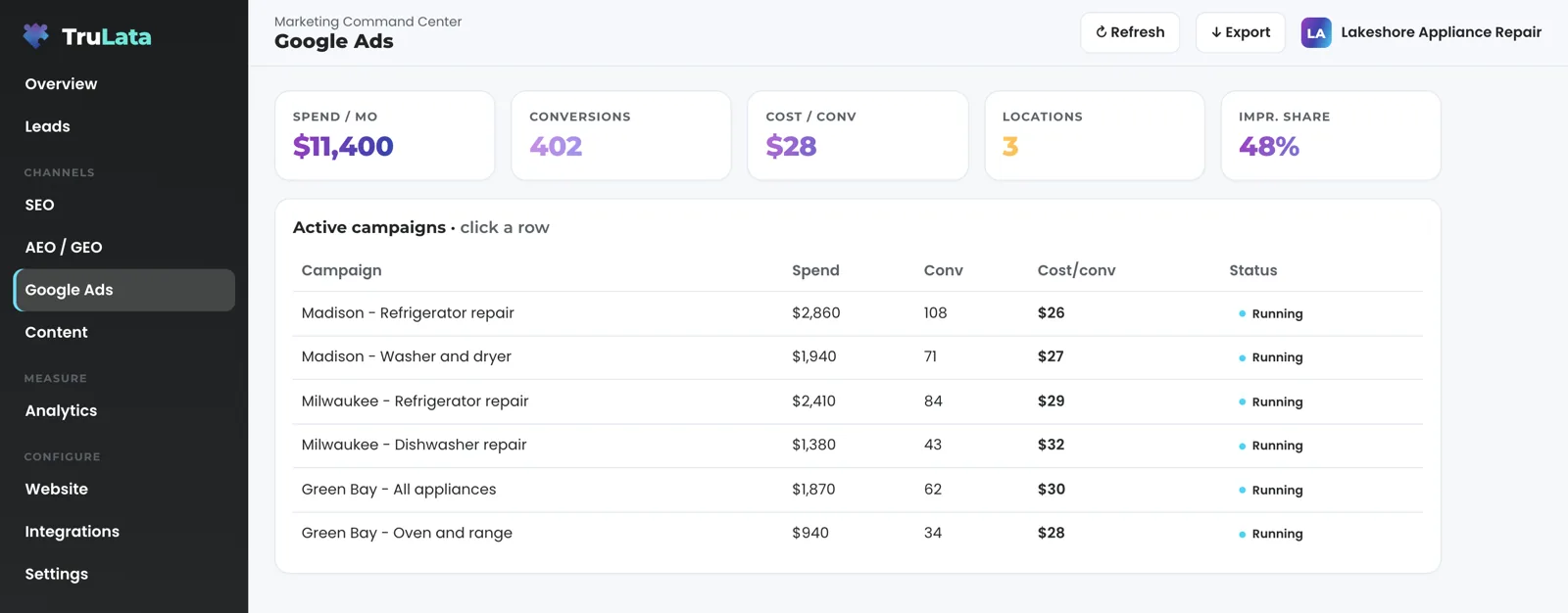
Yes, and that is the outcome this service exists for. You add a second location, a second brand under the same owner, a new service line or more trucks across more towns, and each one is read on its own campaign rows and its own lead rows. Behind every TruLata is a per-client connection map, and it holds several accounts of each kind, one row per account. Each Google Ads account you map is one more row, confirmed by a person during setup, and its campaigns appear one row per campaign beside the first account's; TruLata reads one Google Analytics property and one Search Console site, and the Business Profile listing where one is connected. Google Ads totals on the screen sum every account mapped to TruLata, and the campaign rows beneath them are where one location's spend, conversions and cost per conversion are read on their own. The multi-location and multi-truck use case walks through the map from the owner's seat.
Headcount is one lever. This is the other. The routine work runs on a schedule whether anyone is at a desk, and a budget or bid change moves within the limits set for your engagement. Our team adds the program on top: reading your baselines in setup, setting the cadence, the keyword set and the target profile with you, deciding what to turn on next, and building the workflow between the tools you already run, on the same pattern, where one is needed.
It is built for a service business, one with a territory or several, a second brand or a national footprint, and it is offered nationally. If that is you, the next location is a campaign of its own in the Ads view, its own lead rows and a seat for its manager, on the screen you already open.
One connection map, one row per account
- Google Ads account, first location
- Google Ads account, second location
- Google Ads account, a second brand
- Totals summed across every mapped account
- One row per campaign
- Each location read on its own
What does TruLata show me as the business grows?
The Overview first. Every workstream sits in a grid marked Running with its latest figure, and beside the page title a stamp says when the numbers were pulled. Open the page and it loads last night's snapshot, then runs a live pull behind it when that snapshot is older than five minutes. The live data page covers that first second.
Then the views that carry a growing business. The Google Ads view reports spend, conversions and cost per conversion for every campaign across every account in the map. Where your forms feed the lead sheet, the Leads view reads it newest first, and where we build the form to capture it, each row carries the page the form sat on and the town the visitor gave. The Analytics view reads sessions, sources, pages and key events from the one GA4 property TruLata is configured to read, and the search view reads one Search Console site, and the Business Profile listing where one is connected. The Team view shows seats used of plan seats, and a manager is invited by email as Member or Admin.
Read the freshness ceiling before you buy. Your CRM, Stripe, your booking platform, website leads and email statistics are live. Google Ads and GA4 intraday figures lag by hours. Search Console runs two to three days behind. Stripe is read only and card data is never read. A phone lead counts when your CRM records it, and a call-tracking platform with an API is connected during setup. Each new source you connect widens what the screen reads.

Headcount is one lever. This is the other.
What runs on a schedule, and what still needs a person?
The scheduled work runs whether anyone is at a desk, and the ads change watch covers every Google Ads account in the map, not only the first. At 12:01am Central a fallback snapshot bakes for every client from one registry; a failed pull or a failed syntax check leaves the previous page up, whole. At 7:05am Eastern the ads change watch reads each mapped account's change history and user list, separates our own writes and routine noise from material changes by anyone else, and raises the material ones to the team the same day, so a setting switched on under any login, or a new address given access on any mapped account, is known the next morning.
At 7:20am Eastern, on an instance whose forms feed the lead sheet, a lead watch built for that instance runs five checks against Ads and GA4: loader, blind, ads blind, stalled and silent. It sets the leads that landed against the conversions Google counted, so a dead tag, a blind ad account or a stalled form is flagged the next day rather than at the end of the quarter. Weekly, on Command, prospects are sourced to the target profile set with you. On Launch, Growth and Command, each topic passes a demand gate on real search volume before a word is written, and each piece is filed as a Google Doc in a Drive folder kept for your business.
A budget or bid change in your ads account moves within the limits set for your engagement and lands in your account's own change history. Prospect emails leave from a review-first queue; a person releases them, or the queue releases on the schedule set for the engagement, and every send is logged with the draft, the mailbox and the time. Request a website, content, keyword, category or targeting change from the screen and it reaches the team as a logged ticket; the engine's writes to your ad accounts and your site go through their APIs and land in each account's own change history.
Every account in the map, every day
- Fallback snapshotEvery client, from one registry
- Ads change watchEach mapped account, not only the first
- Lead watchBuilt per instance: loader, blind, ads blind, stalled, silent
- Prospect sourcingTo the target profile set with you
A blended number hides which half is working.
Can I see it before I talk to anyone?
Yes. Open the demo at demo.trulata.com. It opens with your name and email. It runs on a fictional company called Meridian, every number in it is illustrative, and it is the same engine code every client dashboard runs. Open the Overview and find the workstream grid. Open Google Ads and read the campaigns table, one row per campaign.
The demo is one fictional business; on your own instance a second business is a second set of rows in the map, confirmed by a person during setup. Growth is measured from your own records rather than a platform's report: the search view sets the leads your forms counted beside your positions, and a position there is Search Console's average for the query rather than a rank tracker's guess. Ranking is not earning. That is why a new location is judged on the leads its forms recorded, and proving which dollar made the phone ring starts there.
The demo
- One fictional business, Meridian
- Every number illustrative
Your own instance
- A second business is a second set of rows in the map
- Confirmed by a person during setup
- Each location judged on the leads its forms recorded
Which tier do I need to scale on it?
Starter includes the TruLata dashboard, full analytics, leads, search visibility, the AI visibility program, managed Google Ads search, the assistant and briefings and support tickets. Google Ads search is managed on all tiers. The content engine runs on Launch, Growth and Command. Meta ads are managed on Growth and Command. The outbound engine runs on Command. Command adds the outbound engine, social media management and your full marketing team, always on, is scoped per engagement and carries no number on this site.
Seats are three on Starter, three on Launch, ten on Growth and unlimited on Command, and a business with a manager per location needs a seat for each of them. Starter is $400 a month, Launch $650, Growth $1,200, and Command is scoped per engagement. Every published tier is month to month with nothing metered, and an annual commitment takes twenty percent off the monthly. The pricing page carries the same figures.
Can your team run the growth program for me?
Yes, and that is the service this page sells. The first half is the diagnosis, done on your own numbers. Early in setup our team makes the first pull and the baselines, and from those our team reads where the leaks are: the campaign whose conversions Ads counts while your forms record fewer. Then we set the cadence, the keyword set and the target profile with you and decide what to turn on next. Where growth needs a workflow beyond what the product ships today, we scope it with you and build it on the same pattern: routine on a schedule, judgment with a person, every action logged. Automation, custom software and AI agents cover the building side; organizational alignment covers the team that runs it.
The second part is running it. Command adds the outbound engine, social media management and your full marketing team, always on, scoped per engagement. The managed strategy retainer sits on top of any tier, scoped with you, and puts strategy, optimization and the approvals on our side: our team owns the review-first queue and its switch, and runs the content cadence and its approvals. Every change our team makes in your Google Ads account lands in your account's own change history under our login, and the same 7:05am Eastern watch sorts it as ours. Neither carries a number on this site. The managed page covers both; the pricing page carries the three published tiers.
TruLata is also a marketing services firm. Fractional CMO steers the demand, paid search runs the account the ads watch reads, search feeds the search view, and local services marketing is the hub for a trade with a territory. The services hub lists the rest.
- DiagnoseThe first pull and the baselines, early in setup
- Find the leaksThe campaign whose conversions Ads counts while your forms record fewer
- Set the programCadence, keyword set and target profile, with you
- Build what is missingRoutine on a schedule, judgment with a person, every action logged
- Run itOn Command or the managed strategy retainer
Each addition, and where you read it.
| What you add | Where it shows | How fresh |
|---|---|---|
| A second location or brand | Its own campaign rows in the Ads view and its own lead rows naming page and town; one TruLata dashboard reads one GA4 property and one Search Console site | GA4 hours behind intraday; Search Console 2 to 3 days behind |
| A new Business Profile listing | One row in the map per listing; the search view reads the listing TruLata is connected to: rating and review count | Through yesterday, on Google's schedule |
| A new campaign or a second Ads account | One campaign row per campaign across every mapped account: spend, conversions, cost per conversion | Hours behind; change history read daily at 7:05am ET |
| A new service line page | Where we build the form to capture it, each lead row names the page it came from and the town the visitor gave | Live, as the form is submitted |
| A new manager | A seat on the Team view, Member or Admin, signed in by a single-use magic link | Removed from the Team view; access ends within 30 seconds |
| A CRM or booking platform | The Jobs view: jobs and the job pipeline; a coming-soon card until the data is trustworthy | Live |
| A new content track | The Content view: pieces by stage, each filed as a Google Doc in a Drive folder kept for your business | On your cadence, on Launch, Growth and Command |
Every figure on the screen is read from a source you connected, and the stamp beside the page title says when it was pulled. A phone lead counts when your CRM records it, and a call-tracking platform with an API is connected during setup. Card data is never read. Every budget or bid change moves within the limits set for your engagement and sits in your account's own change history.
Questions, answered.
Is this consulting, or software?
Both, on one screen. TruLata is the software: one dashboard per client, refreshed when you open it, with the scheduled work running whether anyone is at a desk. The service is our team reading your baselines, setting the cadence, the keyword set and the target profile with you, deciding what to turn on next, and building any workflow beyond what the product ships today, on Command or through the managed strategy retainer, each scoped with you.
Can I run two businesses or several locations on one TruLata dashboard?
Several locations of one business, yes: each location's campaigns are their own rows in the Ads view, each lead row names the page and the town where we build the form, and a manager per location gets a seat; one TruLata dashboard reads one Google Analytics property and one Search Console site, and its Google Ads totals sum every account mapped to it, so a second unrelated business is scoped with us rather than added as rows. Each account is suggested by us and confirmed by a person during setup.
How do I know which location or service line produced a lead?
From the lead row. Where we build the form to capture it, the row carries the page the form sat on and the town the visitor gave, written server-side as the form is submitted, and the Leads view reads the sheet newest first. A call straight to a truck counts when your CRM records it, and a call-tracking platform with an API is connected during setup.
Who decides what to turn on next?
On a self-run tier, you do, with the screen to read from and a request from the screen that reaches the team, logged. With the managed strategy retainer, our team does, scoped with you. On every engagement a budget or bid change stays within the limits set for it, and it sits in your account's own change history with who made it.
Which tier includes it?
Starter includes the TruLata dashboard, full analytics, leads, search visibility, the AI visibility program, managed Google Ads search, the assistant and briefings and support tickets. The content engine runs on Launch, Growth and Command, Meta ads on Growth and Command and the outbound engine on Command. Command adds the outbound engine, social media management and your full marketing team, always on. Seats are three on Starter, three on Launch, ten on Growth and unlimited on Command. Command and the managed strategy retainer are scoped with you and carry no number on this site; the three published tiers are on <a href="/product/pricing">the pricing page</a>.
See how it would run
for your business.
15 minutes with TruLata. We show you what your marketing brings in, what each lead costs, and what we would change first.
Book a demo or start a 7-day free trial
No card. It ends on its own after 7 days unless you add one. See pricing.
New here? See what TruLata is. Prefer to write? Send us the one thing you want to know.
Start here: AI marketing platform · AI marketing software · all-in-one marketing platform · marketing automation software · marketing software for small business.
- Refreshed when you open itLive data on page load, never a monthly PDF
- Counted from your own formsLeads recorded server-side, compared daily with Ads and GA4
- Seen in AI answersHow often ChatGPT, Gemini, Claude and Grok name you, measured
- Every send loggedProspect emails leave from a review-first queue, and every send is logged.