

Get the view or integration your business is missing, built on software you already open.
TruLata is the software. Custom work is scoped on top of it: a source nobody reads yet, a view your trade lives on, a watch that runs every morning against one of your accounts.

What do I get when I ask TruLata for custom software?
A dashboard that reads your accounts and shows your numbers the way your business runs, hosted for you. TruLata is the software: one dashboard per client, a static site at your own trulata.com address behind our sign-in gate, with the live payload served from a managed cloud service. Custom work is scoped on top of it and built to load after the shared engine rather than as a fork of it.
That decides what you get in year two. The engine every dashboard runs is one shared file, checked against the canonical copy before every deploy. Anything built for you lives in your own file, loaded after the engine, so your piece survives every engine refresh and your dashboard keeps every upgrade. The same preflight checks that no other client's name appears anywhere in your build.
Custom work carries no hourly rate. TruLata is priced by tier, month to month, with nothing metered, and the custom piece is scoped with you on top of your tier. If your tier already carries what you were about to ask for, we say so first. We build this for service businesses, and how TruLata works shows what the base already does.
How a custom piece loads
- The shared engine, checked against the canonical copy before every deploy
- Survives every engine refresh
- Keeps every upgrade
- No other client's name anywhere in your build
What does TruLata already read and show?
Before anything custom is written, the screen already carries the views a service business runs on: Overview, Revenue, SEO, AEO / GEO, Google Ads, Content, Outbound, Email, Analytics, Integrations, Settings, Account, Team, Billing, Branding, Social, Jobs, Leads, Website and Support. A view appears only when its source is connected, and Creative exists only on the accounts where we run paid social.
The accounts you already run feed it: Google Analytics 4, Search Console, Google Ads and Google Business Profile, your CRM, Stripe, your booking platform, your email platform, your website platform and Meta, plus your website forms, which append each submission to a lead sheet server-side that the Leads view reads newest first. Anything with an API connects, and a connector we have not built yet is built during setup. Stripe, your CRM, your booking platform, website leads and email statistics are live. Google Ads and GA4 intraday figures lag hours. Search Console runs two to three days behind, and its positions are Search Console's own averages, not a rank tracker.
The page refreshes because you opened it. It loads last night's snapshot first, fetches the live payload from cache, and runs a pull behind the request when the snapshot is older than five minutes. The Refresh button starts a pull of two seconds to a little over three minutes and reloads the page when the stamp moves; it never shows an error. See it before you talk to anyone: the demo runs the same engine code every client runs, on a fictional company called Meridian, with your name and email in front of it, and every number illustrative.
What does custom work look like on top of it?
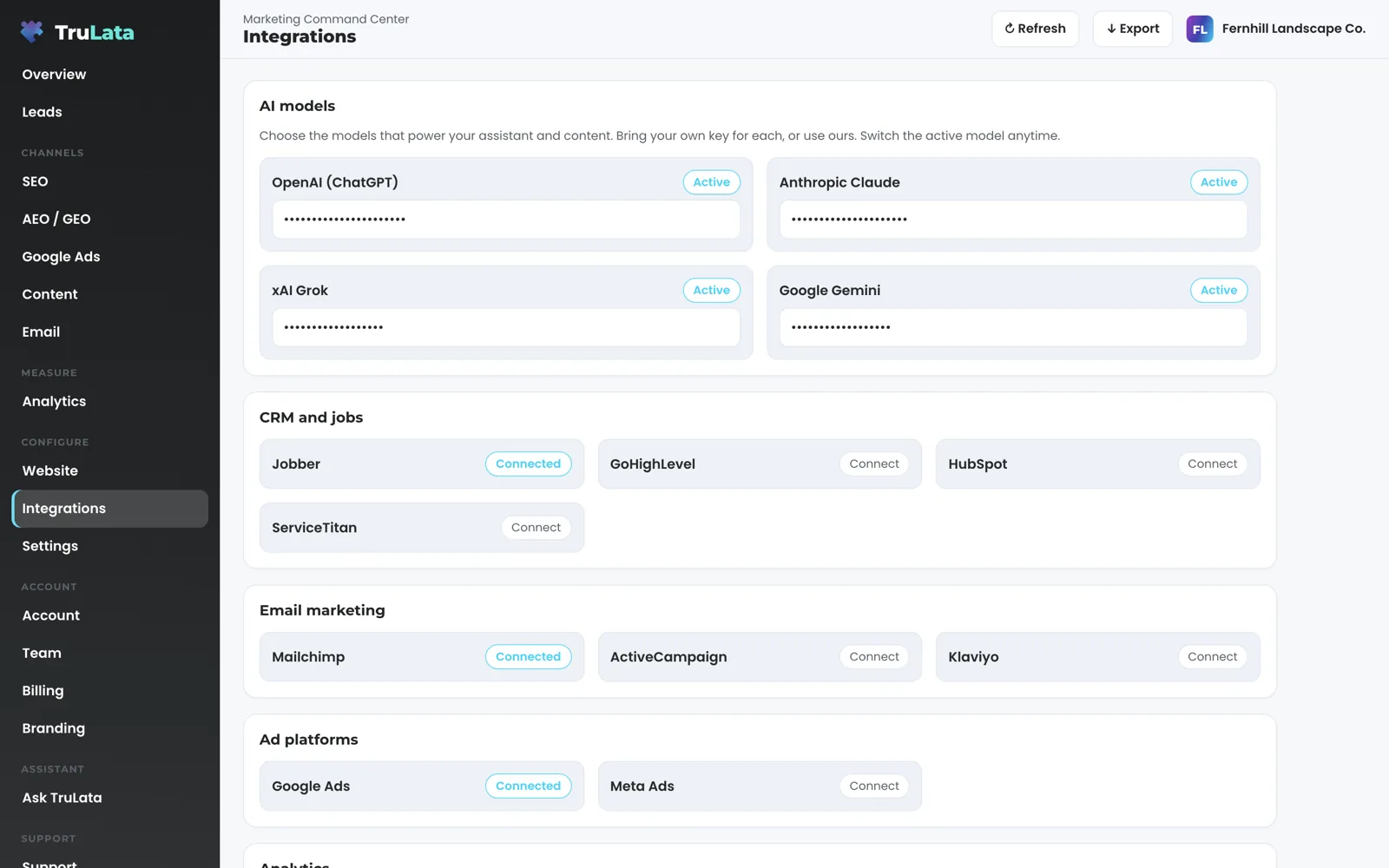
Three shapes, each scoped with you. The first is an integration. The Integrations view lists every connected account and carries a request button; CRM, email marketing, social scheduling and further ad platforms plug in on request. Every Google connection is a grant you can revoke in your own console, and our team connects your CRM, Stripe, your booking platform, your email platform and your forms from the inside with access you grant during setup. A source new to us is connected during setup or scoped as custom work, and its view appears once it is connected.
The second is a view or a dashboard. Each client is one row in a registry with its own pull scripts and its own file loaded after the engine. One client's file adds a date picker with real history and a comparison window drawn on the same chart across the analytics, ads and search tabs. When that client's analytics spanned two Google Analytics properties after a new site launched, the registry recorded both with the dates each covers, and any range crossing the seam is flagged. Your own website can carry an editor at a separate address behind its own login: a save validates the fields, re-renders the static site and redeploys it, and the public site stays one hundred percent static. Today a person builds every site and the editor changes its words, and the tooling grows as it is built. The editor page shows how it works.
The third is an automation, and the two watches in the product show the shape it takes. The ads change watch reads an account's change history and its user list every morning at 7:05am Eastern, sets our own writes and Google's routine churn aside, and raises a material change made by anyone else to the team the same day, so a setting switched on under any login is known the next morning. The lead watch runs five checks at 7:20am Eastern on an instance whose forms feed the lead sheet, measuring the leads that landed against the conversions Google counted, so a dead tag, a blind ad account or a stalled form is flagged the next day rather than at the end of the quarter. Ask for a watch on the number your business lives on and it is scoped the same way.
Custom work, three shapes
An integration
- Requested from the Integrations view
- Connected during setup, or scoped as custom work
- Its view appears once connected
A view or a dashboard
- Your own registry row and pull scripts
- Your own file, loaded after the engine
- A date picker with a comparison window, for one client
An automation
- A watch on the number your business lives on
- Reads, compares, flags and files
- Every morning, like the two in the product

Tell us the number your business lives on, the account nobody reads, or the step someone re-types by hand.
What runs on a schedule, and what still needs a person?
The reading and the watching run on a schedule whether anyone is at a desk. The ads change watch at 7:05am Eastern separates our own writes and routine noise from material changes by anyone else, including the recommendations Google applies on its own. The lead watch at 7:20am Eastern compares the leads your site recorded against what Ads and GA4 counted. At 12:01am Central a nightly job rebuilds a fallback snapshot for every client from one registry, and a failed pull leaves the previous page up. On Launch, Growth and Command, the content engine researches and drafts on your cadence, and auto-publish is a per-client setting. On Command, prospects are sourced weekly to the target profile set with you.
Anything that spends money stays within limits set with you. A budget or bid change in your ads account is made within the limits set for your engagement and lands in your account's own change history. Prospect emails leave from a review-first queue; a person releases them, or the queue releases on the schedule set for the engagement, and every send is logged with the draft, the mailbox and the time. Replies are classified and shown, and not-interested or bounced addresses are suppressed from further sends. From the screen you can set a lead outcome, request a website change, and request a content, keyword, category or targeting change. Each request lands with your team, is logged and carries a ticket number you can quote back to us, and the engine's writes to your ad accounts and your site go through their APIs and land in each account's own change history. Custom automation is scoped on the same line: it reads, compares, flags and files on a schedule, and the change that costs money stays within the limits set for your engagement.
Reading and watching, on a schedule
- Ads change watchour writes and Google's routine churn set aside
- Lead watchthe leads your site recorded against what Ads and GA4 counted
- Fallback snapshotevery client, rebuilt from one registry
- Prospect sourcingon Command
- Content research and draftson Launch, Growth and Command
Which tier do I need before custom work is scoped?
Starter includes the TruLata dashboard, full analytics, leads, search visibility, the AI visibility program, managed Google Ads search, the assistant and briefings and support tickets. The content engine runs on Launch, Growth and Command. Meta ads are managed on Growth and Command. The outbound engine runs on Command. Command adds the outbound engine, social media management and your full marketing team, always on. It is scoped per engagement and carries no number on this site.
Seats are three on Starter, three on Launch, ten on Growth and unlimited on Command. Starter is $400 a month, Launch $650, Growth $1,200, and Command is scoped per engagement. Every tier is month to month with nothing metered, and an annual commitment takes twenty percent off the monthly. Custom work is scoped on top of whichever tier you are on, with no hourly rate, and the pricing page carries the same figures.
Your tier
- Starter is $400 a month, Launch $650, Growth $1,200, and Command is scoped per engagement
- Month to month, nothing metered
- Annual takes twenty percent off
Custom work
- Scoped with you, on top of your tier
- No hourly rate
- If your tier already carries it, we say so first
Can your team run it for me?
Yes. Command adds the outbound engine, social media management and your full marketing team, always on, scoped per engagement. The managed strategy retainer sits on top of any tier, scoped with you, and puts strategy, optimization and the approvals on our side. A change our team makes in your ads account lands in your account's own change history and the same 7:05am Eastern watch reads it and sorts it as ours; account users are read directly, because change events do not log access. The managed page covers both, and the pricing page shows where Command sits above the three published tiers.
Custom software is scoped the same way, with you, on top of the tier or the engagement you are on. Tell us the number your business lives on, the account nobody reads, or the step someone re-types by hand, and we scope the piece that reads it, shows it or watches it. TruLata is also a marketing services firm, and the software runs alongside that work: the services hub lists everything our team does, websites, automation and AI development are the nearest neighbours to this page, and the use cases page shows who it is built for.

Three shapes of custom work, on one engine.
| Custom work | Built on | How it ships |
|---|---|---|
| A new integration | The request button on the Integrations view; manager invitations for Google, inside access for the rest | Its view appears once the source is connected; the source sets the freshness ceiling |
| A per-client view | Your own file, loaded after the shared engine | Survives every engine refresh; the engine is the same code the demo runs |
| A client-specific pull | Your own registry row and pull scripts | Refreshes when you open the page; nightly fallback at 12:01am Central; a failed pull leaves the previous page up |
| A daily watch | The ads change watch at 7:05am ET and the lead watch at 7:20am ET are the pattern | Raises material changes to the team the same morning; it reads and reports |
| A website editor | A separate address behind its own login, each verified email tied to one site | A save validates the fields, re-renders the static site and redeploys it; the public site stays static |
| Requests from the screen | The relay to your team | Logged, with a ticket number; the engine's writes to your ad accounts and your site land in each account's own change history |
| Price | Scoped with you on top of your tier | No hourly rate, nothing metered; Starter is $400 a month, Launch $650, Growth $1,200, and Command is scoped per engagement |
The editor changes a set of content fields on a site we built, and the tooling grows as it is built. Phone leads arrive through your CRM, your inbox and calendar connect where your engagement calls for it, and card data is never read. Positions are Search Console's own averages. Custom work carries no hourly rate and the published tiers carry no setup fee. A custom piece reads, compares, flags and files; budget and bid changes stay within the limits set for your engagement and land in your account's own change history.
Questions, answered.
Where does the custom piece live, and what happens when the engine updates?
In your own file, loaded after the shared engine, plus your own row in the registry that drives the pulls. The engine is checked against the canonical copy before every deploy, so your piece survives the refresh and your dashboard keeps every upgrade.
Is there an hourly rate?
Custom work is scoped with you on top of your tier and carries no hourly rate. TruLata is priced by tier, month to month, with nothing metered. Command and the managed strategy retainer are scoped as well and carry no number on this site.
Can you connect a tool that is not on the integrations list?
Yes. Anything with an API connects: CRM, email marketing, social scheduling, ad platforms and more, and the Integrations view carries a request button. <a href="/product/integrations">The integrations page</a> lists the connectors named today; a connector we have not built yet is built during setup, and its view appears once the source is connected.
Can you build my website with an editor?
Yes. We build the site and host it as static files on your own domain. The editor lives at a separate address behind its own login with a one-time PIN, and each verified email is tied to one site. A save validates the fields, re-renders the static site and redeploys it, and the public site stays one hundred percent static. A person builds every site today, and the tooling grows as it is built. <a href="/websites">The websites page</a> covers the build.
Can a custom automation spend money or email my customers?
It reads, compares, flags and files on a schedule. A budget or bid change in your ads account is made within the limits set for your engagement and lands in your account's own change history. Prospect emails leave from a review-first queue; a person releases them, or the queue releases on the schedule set for the engagement, and every send is logged with the draft, the mailbox and the time.
How long does setup take before custom work is scoped?
Custom work is scoped once the base screen shows your own numbers, so the scope answers a number you have seen.
See how it would run
for your business.
15 minutes with TruLata. We show you what your marketing brings in, what each lead costs, and what we would change first.
Book a demo or start a 7-day free trial
No card. It ends on its own after 7 days unless you add one. See pricing.
New here? See what TruLata is. Prefer to write? Send us the one thing you want to know.
Start here: AI marketing platform · AI marketing software · all-in-one marketing platform · marketing automation software · marketing software for small business.
- Refreshed when you open itLive data on page load, never a monthly PDF
- Counted from your own formsLeads recorded server-side, compared daily with Ads and GA4
- Seen in AI answersHow often ChatGPT, Gemini, Claude and Grok name you, measured
- Every send loggedProspect emails leave from a review-first queue, and every send is logged.