

Change the words on your site yourself. Live in about one to two minutes.
Sign in with a code sent to your work email, edit the labelled fields for your site and press Save and Publish. The site re-renders, checks itself and redeploys, and your visitors receive the re-rendered files alone.

What can I change without asking anyone?
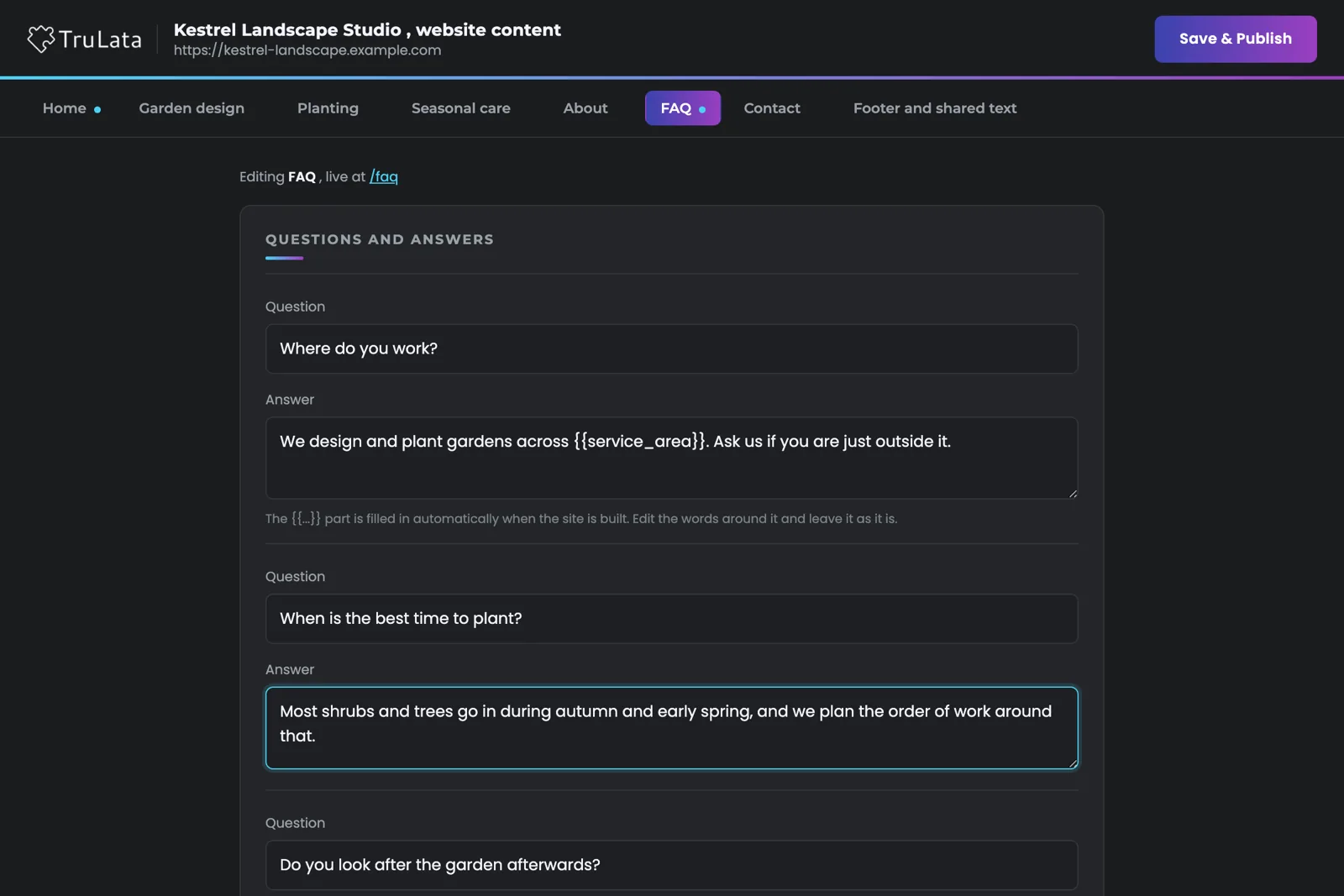
The words. Headings, paragraphs, the small label above a heading, button text, contact lines and lists such as certifications. Open the tab for a page and edit what that page says. Edit the footer once on the shared tab, where your site has one, and the change lands on every page. The browser tab title and the description Google shows sit last, on each page that offers them.
Layout, theme and shared facts stay out of reach. A book's page numbers and ISBNs, for example, live in the build, so no edit can make one page disagree with another. Where a figure is offered, it comes as a labelled field the build checks before it publishes.
Kept in the build
- Layout and theme
- Shared facts, so no page can disagree with another
- A figure is offered only as a labelled field the build checks
Yours to change
- Headings, paragraphs and the small label above a heading
- Button text, contact lines and lists
- The footer, once, on the shared tab
- The tab title and the description Google shows
Will I know what each field does?
Yes. Fields carry plain labels, not code: "Phone (optional, leave blank to hide)", "Line under the logo", "Small label above the heading". Figures such as prices and hours are offered only under a label written for your site. Fields run in the order the page reads, top to bottom, so the section you see on your live site is the section you find in the editor.
A note under a field tells you when the build fills in part of that line, and asks you to edit the words around it. A list with a fixed number of entries appears as one field per entry, so you can reword every item while the count the page depends on stays fixed.
What happens when I press Save and Publish?
Five steps, in order. The service keeps a copy of the content as it was. It straightens any typed dashes. It writes the new content file. It re-renders every page from that file, and the render is the check: on a site that carries figures, a price typed as a word, a price typed into an answer, or a fill-in token the site has no value for each fails it. When the render passes, the result goes to Cloudflare Pages and the editor tells you the site is publishing and will update in about one to two minutes.
When the render fails, the previous content goes back, the live site stays as it was and the editor shows you the reason. A dot on each page tab marks the pages you have touched, so you know exactly what a publish will carry before you press the button.
- Keep a copyThe content as it was
- StraightenAny typed dashes
- WriteThe new content file
- Render and checkEvery page, from that file; a bad figure or a missing token fails here
- DeployTo Cloudflare Pages, about one to two minutes
When the render fails, the previous content goes back, the live site stays as it was and the editor shows you the reason.
Will my site stay fast?
Yes. The editor runs on its own address, edit.trulata.com, and your site runs static files alone. On our static path your public site is a set of static files on Cloudflare Pages, served as they are: a visitor's request is answered from the edge, with the page and its own assets alone. What reaches your site is the re-rendered files. Read why the public page carries only its own files.
Two addresses, two jobs
- You, at edit.trulata.com
- Re-rendered static files on Cloudflare Pages
- Your visitor gets the page and its own assets

Change the words on your site yourself.
Who can open my editor?
Only the people on your list, checked in three layers. First, edit.trulata.com is its own Cloudflare Access application with its own guest list; sign-in is a One-Time PIN at your work address, with no account and no password. Second, the tunnel fences that hostname to the editor path alone; every other path returns a 404, so the address reaches the editor alone. Third, our service keeps a verified email list per site, so each client opens their own editor and theirs alone.
The link we send you carries nothing secret, and the page holds no credential; your browser carries the sign-in on its own. Our team can open any site it manages. Read the three layers in detail.
Our team can open any site it manages.
Will it work on my site?
Yes, on a site we build. Two client sites run on it today, plus concept sites in build. Each has a content file and a generator that renders the pages from it, and the editor is the front of that pair. A site hand-built elsewhere needs that generator written first; we have written one for a site that arrived as hand-authored HTML. WordPress takes its own path: a save writes the copy into the site's own store and clears its cache instead of redeploying, and the theme and the layout stay with our team.
The editor does one thing: it changes your own words on a site we built, with the public page kept static. The design and build of the site itself come from our team. See the website view for what TruLata shows about the same site, and our website services for the design and build itself.

The editor, step by step.
| Step or layer | What happens | Where it runs |
|---|---|---|
| Sign-in | Cloudflare Access, its own application and guest list, One-Time PIN to your work address | edit.trulata.com |
| Path fence | The hostname reaches the editor path only; every other path returns 404 | The tunnel |
| Site map | A verified email list per site; our team can open any site it manages | Our service |
| Fields | Plain labels per site; a price or an hour is offered only under a written label; facts held in the build are not offered | Per site |
| Save | Previous content kept, dashes straightened, content file written | Our service |
| Publish | Every page re-rendered and checked, then deployed to Cloudflare Pages, about 1 to 2 minutes | Cloudflare Pages |
| Failed render | Previous content restored, live site unchanged, reason shown in the editor | Our service |
| On the public page | Static files alone, served from the edge | Your site |
The editor lives at its own address behind its own login, and what reaches your site is the re-rendered static files, checked before they ship.
Questions, answered.
Do I need an account or a password?
A One-Time PIN arrives at your work email each time you sign in, so you sign in without an account. There is no password to keep, and the link we send carries nothing secret.
Can a save break my site?
A page that fails to render stays off the live site. The service keeps the previous content before it writes anything; when the re-render fails, that content comes back, the live site stays as it was and the editor shows you the reason.
How long until my change is live?
About one to two minutes after Save and Publish. The site re-renders, deploys to Cloudflare Pages, and the editor tells you it is publishing.
Can I change prices, hours or the page layout?
Words yes; the layout and theme stay with our team, who change them for you. Figures depend on the site: where one is offered, it is a labelled field the build checks, so a price typed as a word is refused. Some figures stay in the build, such as a book's ISBNs and page numbers, and our team changes those for you.
Can someone else at my company edit too?
Yes. Send us their work email. We add it to the guest list and map it to your site. Sign-in is open to the addresses on the guest list; one that signs in without a mapping to your site sees a message to ask us.
Does it work with a WordPress site?
Yes, on its own path. A save writes the copy into the site's own store and clears its cache instead of redeploying, and the theme and the layout stay with our team. Most sites on the editor run on our static path.
See it running
before you decide.
The demo is the real product on a fictional company, with your name and email in front of it. Pricing is three published tiers.
Open the live demo See pricing
New here? See what TruLata is. Prefer to write? Send us the one thing you want to know.
Start here: AI marketing platform · AI marketing software · all-in-one marketing platform · marketing automation software · marketing software for small business.
- Refreshed when you open itLive data on page load, never a monthly PDF
- Counted from your own formsLeads recorded server-side, compared daily with Ads and GA4
- Seen in AI answersHow often ChatGPT, Gemini, Claude and Grok name you, measured
- Every send loggedProspect emails leave from a review-first queue, and every send is logged.