

Count the leads that came to you. Know what happened to every one.
A marketplace sells you an enquiry a homeowner made to the marketplace, often to several businesses at once. TruLata writes down each enquiry made to you the moment it lands, and your team records what happened next.

How do you count a lead that came to me?
From your own forms, the moment someone submits. The form handler emails your team and appends a row to a lead sheet server-side. The row carries what the visitor typed. Where the site captures first-touch attribution, it also carries the page they submitted from, the landing page, the referrer and any campaign parameters that came with the visit. The source is written down with the lead, not reconstructed later from a tag. The Leads view reads that sheet newest first.
That row is your ground truth. Google Ads conversions and GA4 events are measurement layered on top, and measurement breaks. A ledger written by the handler keeps counting on the day every tag on your site is dead. The glossary entry on lead source tracking shows how a source gets attached to a lead.
- Someone submits your formWhat they typed, as they typed it
- Your team gets an emailThe moment it lands
- A row is appended server-sideWith the landing page, referrer and campaign tags where the site captures them
- The Leads view reads itNewest first, with the source already on the row
That row is your ground truth.
Who decides whether a lead was any good?
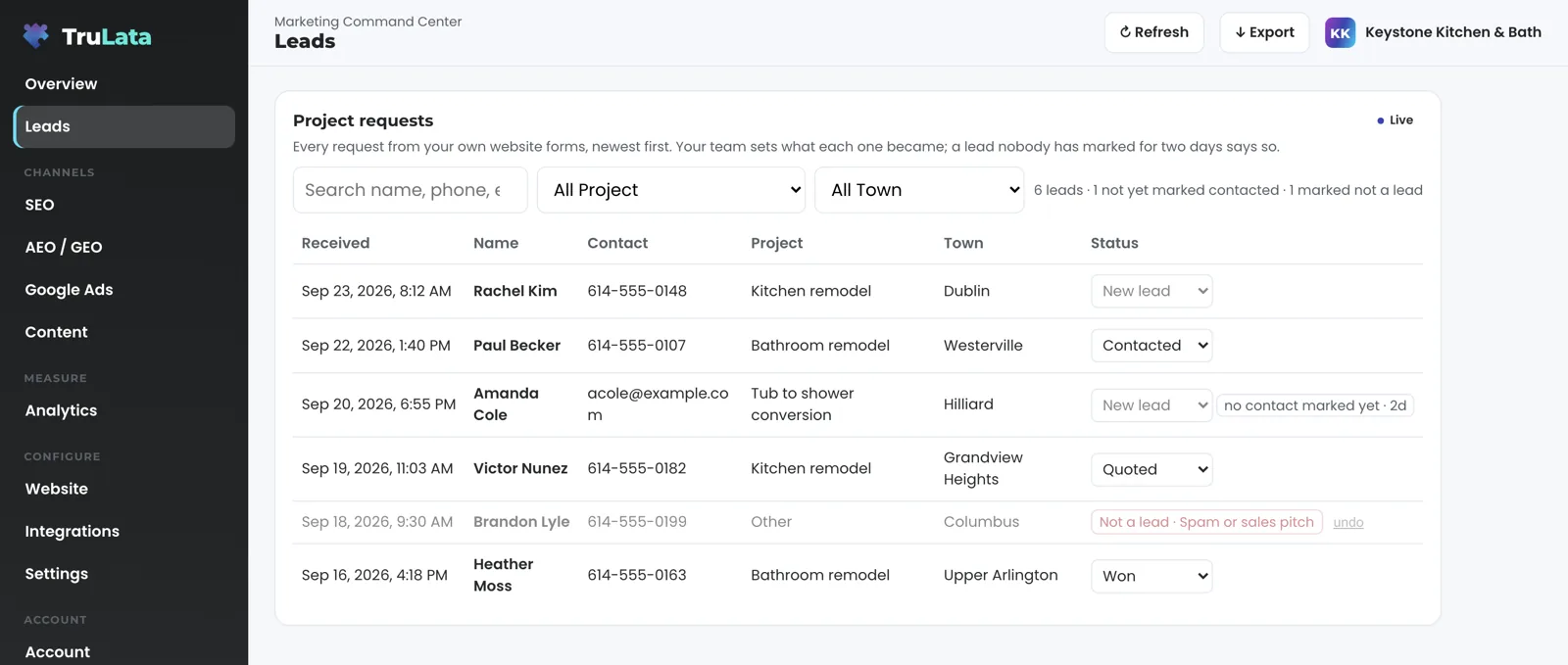
You do, from the screen. Your staff set a disposition on each lead: contacted, quoted, won, lost. They can also mark a row not a lead, with a reason: existing customer, spam or sales pitch, wrong number, out of area. That label is your record and stands until your own team clears it. A lead left unmarked for two days or more wears a badge that says so. The badge reads your own team's follow-up and that alone.
A marketplace cannot offer this. On a marketplace, a dispute about lead quality goes to the marketplace. Here you record the outcome on your own ledger, and that turns a count of leads into a count of won jobs. Setting an outcome writes to the lead record on your own ledger. Changes to your ads account, your CRM, your site or your Business Profile go through requests to the team and the engine's own API writes, each one logged.
How do I know the count is right?
A daily watch checks it against the two other counts that claim to know. On an instance whose forms feed the ledger, the watch runs at 7:20am Eastern with five checks: the tag still loads, leads are landing while GA4 records no form events, paid leads are landing while Ads reports zero conversions, a reliably spending campaign has gone to zero, and traffic continues with no leads at all. The ads view shows what Google counted. The ledger shows what your forms counted. The watch says when they disagree.
A broken tag reports zero rather than an error, which is why the comparison runs every morning instead of when someone thinks to ask for it. A dead tag, a blind ad account or a stalled campaign reaches your team the next day rather than at the end of the quarter. The ledger keeps counting while the measurement is put right, so the budget decision is made on what your own forms recorded. A marketplace reports its own count; this one is checked against your own records every day.
The honesty runs the other way too. A phone lead counts when your CRM records it, or through a call-tracking platform connected for your instance during setup, and this page counts only what a system recorded.
Three counts compared: your ledger, Ads conversions and GA4 key events. The watch says when they disagree.
If I stop buying leads, where do new ones come from?
From engines that build demand you own. A marketplace can deliver enquiries on day one. A program takes its first weeks to build, and what it builds stays yours. The outbound engine, on Command, sources prospects each week to the target profile set with you, finds a deliverable address or routes to a contact form, and drafts an opener. Prospect emails leave from a review-first queue; a person releases them, or the queue releases on the schedule set for the engagement, and every send is logged. Replies are classified, and not-interested and bounced addresses are suppressed. Where the content engine runs, it publishes only topics that pass a demand gate on real search volume and how occupied the results already are. Where managed Google Ads search runs, a change watch reads the account daily at 7:05am Eastern. The search and AI visibility program measures where you stand across Google and the answer engines. Once you have added us as a manager, your Business Profile's reviews, rating and listing performance are read as well.
Keep your marketplace account if you want it. A marketplace enquiry that comes through your own form lands in the ledger like any other. One that arrives as a call counts when your CRM records it. One that lives only in the marketplace's account is counted in its own column where that account is connected for your instance. We promise no number of leads a month; no number printed here would be honest for a business we have not yet looked at.
Engines that build demand you own
- Outbound, sourced weekly
- Content, demand-gated
- Managed Google Ads search
- Search and AI visibility
- Business Profile reviews
- A row in your ledger
- An email to your team
- An outcome you set

A program takes its first weeks to build, and what it builds stays yours.
What will this cost me?
Starter is $400 a month, Launch $650, Growth $1,200, and Command is scoped per engagement. Starter carries the TruLata dashboard, full analytics, leads, search visibility, the AI visibility program, managed Google Ads search, the assistant and briefings and support tickets; Launch adds the content engine; Growth adds Meta ads; Command adds the outbound engine, social media management and your full marketing team, always on. Seats are three on Starter, three on Launch, ten on Growth and unlimited on Command. Every tier is one flat monthly figure, month to month. An annual commitment takes twenty percent off the monthly. Our team makes the connections with access you grant, and every Google connection is a grant you can revoke in your own console.
Put that beside your marketplace invoice, the one figure on this page that only you can see. This is built for a service business, and it counts every lead one at a time from your own forms and reads the volume from GA4 and your CRM. Set the gap between a shared enquiry and one that came to your own door against that invoice, and the argument is on your own numbers. The pricing page carries the same figures, and the local services marketing page describes the agency work for the same buyer.

Mechanism, not marketing.
| Question | Marketplace lead | TruLata lead |
|---|---|---|
| Where the enquiry arrived | The marketplace's own form | Your website's form |
| Who else received it | Often more than one business | Nobody. It came to you |
| Where the record lives | The marketplace's account | A ledger row written server-side, shown newest first |
| Where the source is recorded | The marketplace | Landing page, referrer and campaign parameters, written with the row where the site captures them |
| Who sets the outcome | The marketplace, by dispute | You, from the screen: contacted, quoted, won, lost, not a lead |
| Cross-check | The marketplace's own reporting | Daily against Ads and GA4, on an instance whose forms feed the ledger |
| Phone leads | The marketplace's count | Counted when your CRM or a connected call-tracking platform records them |
| What you pay | Set by the marketplace | Flat monthly on the published tiers; Command scoped per engagement |
This page compares on mechanism: leads counted from your own forms and your CRM, outcomes your team sets, and our published tiers beside a marketplace invoice only you can see.
Questions, answered.
What is a shared lead?
An enquiry a homeowner made to a marketplace, passed to the businesses paying for it, often several at once. The customer's first relationship is with the marketplace, and the record stays in the marketplace's account.
How does TruLata count a lead differently?
From your own website's form, server-side. Each submission is appended to a lead sheet as it arrives and emailed to your team. Where the site captures them, the landing page, referrer and campaign parameters are written in the same row.
Can I say what happened to a lead?
Yes. Set contacted, quoted, won or lost from the screen, or mark a row not a lead with a reason. The label is your record and stands until your team clears it.
Do you count phone calls from a marketplace?
When your CRM records the call, or through a call-tracking platform connected for your instance. A marketplace's own account is counted in its own column where it is connected for your instance.
Do I have to stop buying leads to use this?
Keep the marketplace account if it pays for itself. A marketplace enquiry that reaches your own form is counted like any other.
What does it cost?
Starter is $400 a month, Launch $650, Growth $1,200, and Command is scoped per engagement. The three published tiers are flat and month to month. Your marketplace invoice is the figure to set beside them, and only you can see it.
See it running
before you decide.
The demo is the real product on a fictional company, with your name and email in front of it. Pricing is three published tiers.
Open the live demo See pricing
New here? See what TruLata is. Prefer to write? Send us the one thing you want to know.
Start here: AI marketing platform · AI marketing software · all-in-one marketing platform · marketing automation software · marketing software for small business.
- Refreshed when you open itLive data on page load, never a monthly PDF
- Counted from your own formsLeads recorded server-side, compared daily with Ads and GA4
- Seen in AI answersHow often ChatGPT, Gemini, Claude and Grok name you, measured
- Every send loggedProspect emails leave from a review-first queue, and every send is logged.