

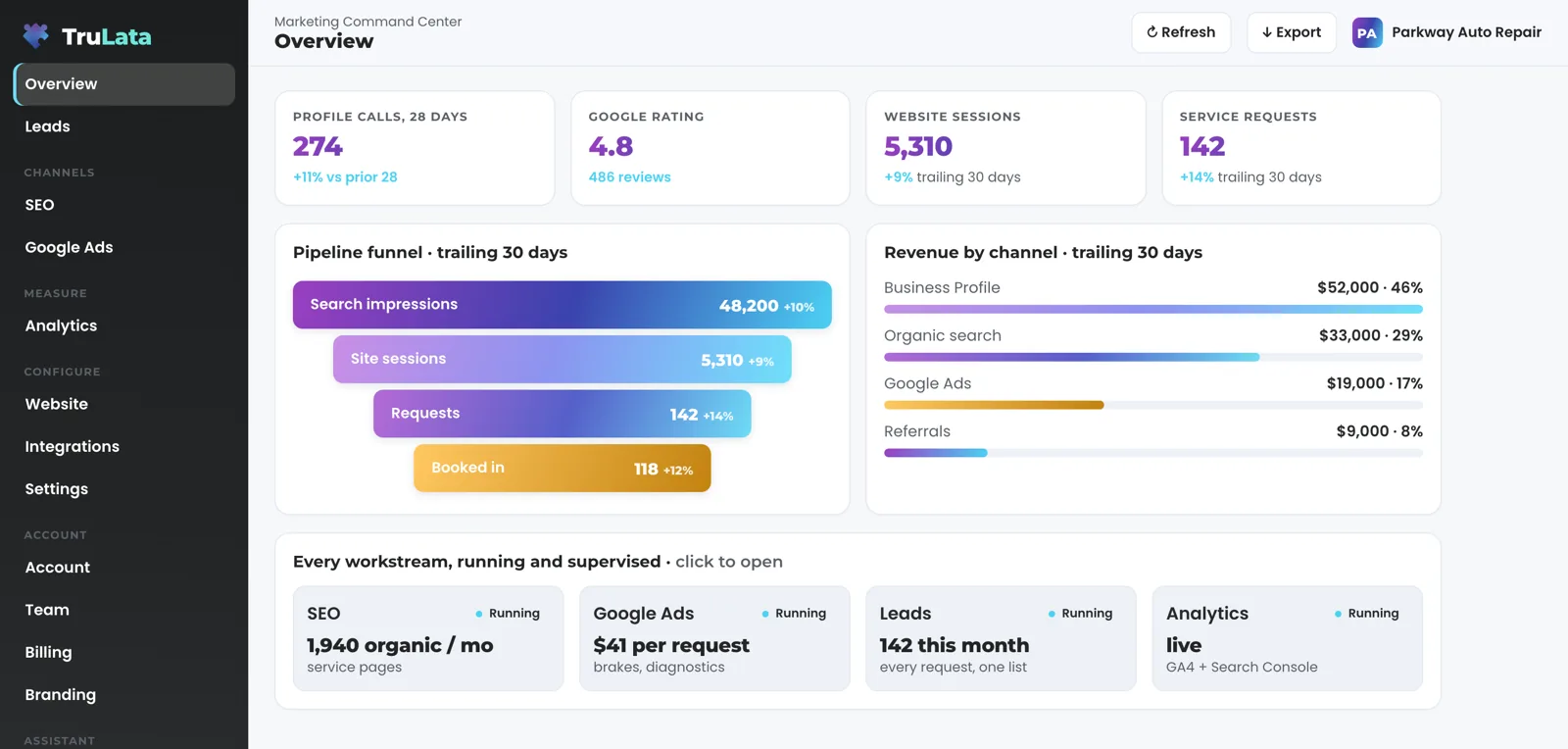
See the calls your Google listing earned, and the rating a buyer reads before dialing.
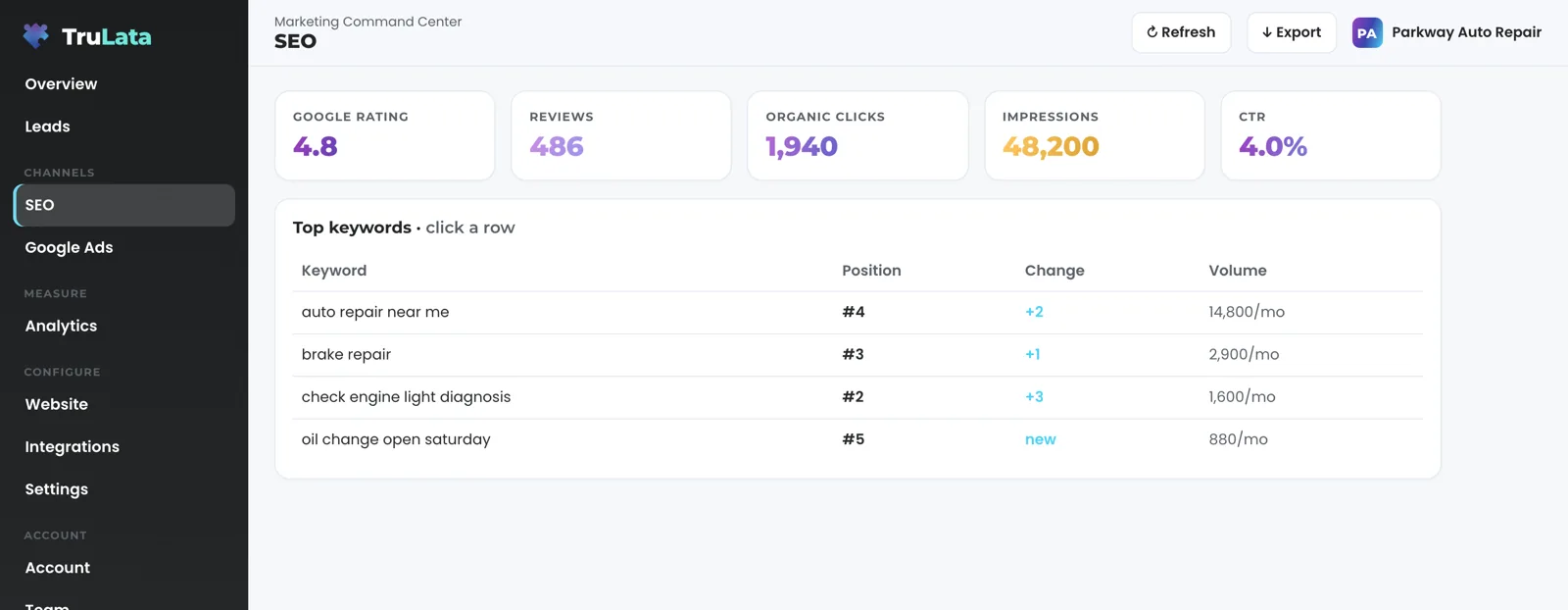
Your listing is the first thing a local buyer reads about you. TruLata shows its rating and review count on the search view beside your queries and positions, and Google's own count of calls from the listing on the overview. You grant a manager role from your own console, and you can revoke it there.

What will I see from my listing?
Two things. Your rating and review count, read from your public Google listing, sit on the search view with a link to the listing itself. Where your listing is mapped and the dashboard is configured for it, the overview also shows the calls placed from the listing: Google's own count of taps on the call button, 28 days against the prior 28.
The calls figure comes from the Business Profile Performance API for the location mapped to your business, so it is Google's count rather than an estimate. If your listing is out of reach for a moment, the review card shows its last reading, and says so plainly before a first reading exists. If the calls figure is unavailable, the row is left out.
Where do my reviews show up?
On the search view, beside your keyword positions and the queries Search Console says you appeared for. The card shows the rating, the stars, the review count and a button that opens your listing on Google. It reads your public listing and refreshes on its own, so the rating you see is the rating a buyer sees. A homeowner reads your reviews before deciding whether to call, so they sit on the same page as your positions and your queries. The three move together. Read them together.
The search view carries the Search Console side of the same story: what people typed, how often you appeared and how many clicked.

The three move together. Read them together.
How do I connect it?
Add our Google account as a manager on the listing from your own Business Profile console. That is your whole step. You keep your password, and your part ends with the invitation. Once the invitation is accepted, your listing appears among the locations our account manages. Our team picks it, maps it to your business and points the listing performance pull at it. The rating and review count read from your public listing, so they show even before the invitation is accepted.
The role is manager, and it stays yours to revoke. Remove our account in the same console and the connection ends. Analytics, Search Console and Ads connect the same way. The full list of connections says what each one reads.
- YouAdd our Google account as a manager on the listing, from your own Business Profile console
- WePick your listing, map it to your business and point the performance pull at it
- You keepOwnership, your password and the right to revoke in the same console
Who can change my listing?
Our team, with the manager access you granted, and you ask for the change from the screen. Manager access lets our team read the listing and edit its fields through Google's own API, service area being the usual case, so a change you ask for lands on the listing itself. Ask by email to [email protected] or from the New request button in the Support view. Your request becomes a numbered ticket you can follow there, and the edit lands on the listing through Google's own API. The security page lists every write path the screen has, so you can read the list yourself.
Google reserves deleting the listing for the owner and grays the option out for a manager in its own console. We ask for manager, not owner.
The owner alone
- Deletes the listing, by Google's rule
- Google grays the option out for a manager
- We ask for manager, never owner
Our team, with manager access
- Reads the listing
- Edits its fields through Google's own API, service area being the usual case
- Works from a numbered request you can follow

Your listing is the first thing a local buyer reads about you.
Does this tell me where I rank in the map pack?
Today the keyword positions on the search view are Search Console average positions for organic results, published two to three days behind, and new views arrive as they are built. What the Business Profile connection adds is Google's own count of calls placed from your listing: the outcome a map pack position exists to produce, measured directly instead of inferred.
Two more things to know. Calls means taps on the call button on your listing, counted by Google. A phone lead counts in the Leads view when your CRM records it, and a call-tracking platform you already run connects during setup like any other source with an API. Listing performance runs through yesterday, because Google does not finalize the current day. The rating and review count refresh on their own from your public listing. For the program that works on the listing itself, our local services marketing is the agency counterpart to this connection.
What the Business Profile connection reads.
| What | Where it comes from | How fresh |
|---|---|---|
| Rating and review count | Your public Google listing | Refreshes on its own |
| Profile calls | Business Profile Performance API | Through yesterday; Google does not finalize the current day |
| Listing fields, such as service area | Edited by our team with manager access | When you ask |
The role you grant is manager: we read your listing's performance and edit its fields, Google reserves removing the listing for the owner, and you can revoke the role in your own console at any time.
Questions, answered.
Do I have to give you my Google password?
You keep it. You add our Google account as a manager on the listing from your own Business Profile console, and you can remove it there at any time. We never ask for your account password.
Do the rating and review count update on their own?
Yes. They are read from your public Google listing, not copied in at setup. The card re-reads the listing when the view opens and its last reading is more than twelve hours old.
Does it show my map pack ranking?
Today it shows Search Console average positions for organic results on the search view, and new views arrive as they are built. The Business Profile connection shows your rating, your review count and Google's own count of calls placed from the listing.
Can I edit my listing from the dashboard?
Ask from the dashboard and it lands on the listing. Press New request in the Support view, your request becomes a numbered ticket, and our team makes the edit through Google's own API with the manager access you granted.
How far behind is listing performance?
Through yesterday. Google does not finalize the current day, so the totals end at the last complete day. The rating and review count refresh on their own from your public listing.
Does calls mean you track my phone calls?
Calls is Google's count of taps on the call button on your listing. A phone lead counts in the Leads view when your CRM records it, and a call-tracking platform you already run connects during setup like any other source with an API.
See it running
before you decide.
The demo is the real product on a fictional company, with your name and email in front of it. Pricing is three published tiers.
Open the live demo See pricing
New here? See what TruLata is. Prefer to write? Send us the one thing you want to know.
Start here: AI marketing platform · AI marketing software · all-in-one marketing platform · marketing automation software · marketing software for small business.
- Refreshed when you open itLive data on page load, never a monthly PDF
- Counted from your own formsLeads recorded server-side, compared daily with Ads and GA4
- Seen in AI answersHow often ChatGPT, Gemini, Claude and Grok name you, measured
- Every send loggedProspect emails leave from a review-first queue, and every send is logged.