

Know which searches bring you clicks, not just where you rank.
Open one screen and read your average positions, the queries Google showed you for, the clicks each one earned and your Google reviews. Search Console supplies both the positions and the clicks, so a phrase that ranks and earns nothing shows up as exactly that.

Which keywords do I rank for, and which ones matter?
Read the phrases Google showed your site for, with the number that says whether each one matters. The Top keywords table lists your top phrases, each with its average position as Search Console reports it and the searches that showed it over the last 30 days. The full list, up to sixty, sits under Queries. Position 4 on 2,400 appearances reads as exactly that. So does page two on 30. Your target keyword set, chosen with your team in the second week of setup when the first pull and the baselines are taken, sits on the Settings view. The change against a prior window sits on the rankings table under Queries, where you choose the comparison.
Click a row and the detail opens: position, volume, and the change and the page that ranks where the pull carries them. Volume is the count of searches in the window where Google showed your site for that phrase. It comes from Search Console, so it is a count of real appearances, not a planner estimate.
Change the set from the screen. Open Settings, find Target keywords and choose Add. Your request goes to your team with a ticket number you can quote back, and it is logged. Your team adds the phrase to the tracked set. A change to your site, your listing or your ads account that follows from it is made through that platform's own API and lands in its own history.
Until your Search Console property is verified, the view runs on Analytics instead: search visits over 30 days, their share of all visits, and your most visited pages. The keyword table waits for Search Console, because a keyword table built on anything else would be a guess.
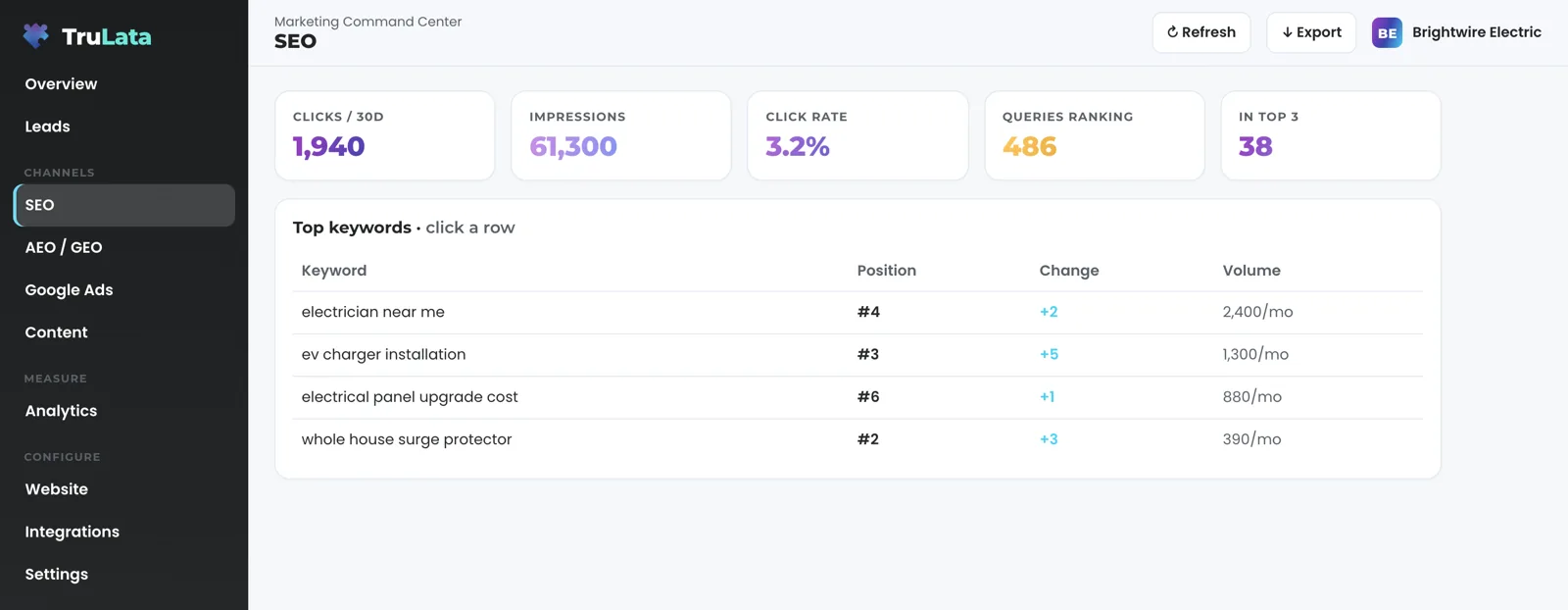
What did people type before they found me?
Search Console answers that, and the view reads it for any window you pick. Choose the last 7, 30 or 90 days, 6 months or 12 months, or set your own dates. Every window ends yesterday, because today is a partial day in every Google source and a half day at the edge reads as a collapse. Three tiles carry clicks, impressions and click-through rate. Under them sits a rankings table sorted best position first: query, rank, prior rank, change and searches. Lower is better, and inside ten is the first page. The table runs up to sixty queries. A query with fewer than three impressions in the window is left off, because a single stray impression is not a ranking. Below it sit the top fifteen queries by clicks, the top fifteen pages, and clicks by device and by country.
Compare against the previous period or the same period last year, or turn comparison off. Every row then carries its prior value, so a move in the change column is a real move and not the arrival of a new phrase; a phrase with no prior value is marked new. Average position is weighted by impressions, so a query seen two thousand times moves it far more than one seen twice. Click Export and the range you picked downloads as a CSV, with the comparison window beside it.
Clicks are the number that separates ranking from earning. A page can hold the top ten for a phrase and send you nobody, and a position chart on its own reads that as a win. So the table carries clicks beside every position, the tiles carry clicks, impressions and click-through rate together, and the leads your own forms recorded sit on the Leads view beside all of it. A position here is Search Console's average for the query on your own property rather than a rank tracker's guess.
Google releases this data two to three days after the searches happen, and the view says so. A note on the view reads that the most recent days in the range are still filling in, so an empty right edge on the chart is Google's lag, not a drop in traffic. Appearances in Google's AI Overviews are measured here, through Search Console, not on the answer-engine view.
A position chart on its own
- Top ten for a phrase
- Reads as a win
- Sends you nobody
Clicks beside every position
- Clicks, impressions and click rate together
- Position weighted by impressions
- The leads your forms recorded, one view over

Clicks are the number that separates ranking from earning.
Are my Google reviews on the same screen?
Yes. Where your Business Profile is connected, a card on the search view shows your rating, the stars, your review count and one button that opens the listing on Google. The card is read from Google and refreshed on a 12-hour cache, not copied in once at setup. When Google is slow to answer, the card says so, rather than showing a sample. A rating outside 1.0 to 5.0 is rejected rather than shown.
Reviews sit beside rankings on purpose. For a local service business the review count is a ranking input as much as an outcome, and a customer reads it before deciding whether to get in touch. Rankings, queries and reviews move together, so you read them together, on one page.
Connect it by adding our Google account as a manager on your listing, from your own Business Profile console, in the first week of setup. The role stays yours to revoke in the same console. We never ask for your account password, and a listing edit is a ticketed request made by our team with that manager access.
How do I compare with the companies I lose jobs to?
Where market data is enabled for your account, the view adds the wider keyword market: the phrases your trade competes on, your rank on each, searches a month, a difficulty score out of 100 and the page that ranks. Rising here means people who have never heard of you finding you. Click a row for the detail.
Three competitive tables sit beneath it. Ranking movement lists up to six keywords you gained and four you slipped on, with the change in places, so repeated losses on one topic say where to reinforce. Competitor keyword gaps list the phrases a competitor ranks for and you do not yet, with who ranks and where; each gap is a page or post your team can build. Competitor paid keywords list what nearby companies pay Google for, with an estimated cost per click, a demand signal your team weighs for your own campaigns or aims organic content at.
This is a paid data layer from a third-party provider, refreshed on a 24-hour cache, and it renders only where your account enables it. When a cycle brings no movement, the table says so instead of showing an old move. The search view itself is on all tiers.
The wider market, where enabled
- Keyword market
- Ranking movement
- Competitor keyword gaps
- Competitor paid keywords
- Where to reinforce
- A page or post your team can build
- A demand signal for your campaigns
Rising here means people who have never heard of you finding you.
Is this the SEO work, or the report on it?
The report, measured on the same screen where the work is read. The work is the program: technical fixes, pages aimed at phrases with measured volume, content that earns links, and the answer-engine layer described on the AI visibility page. If a phrase we targeted has no impressions after ninety days, this view is where it shows, and it is the signal your team acts on.
Part of it runs on a schedule whether anyone is at a desk. Where the content engine runs for you, every topic passes a demand gate on real search volume and on who already holds the top ten for the phrase, so the engine writes for phrases people type and skips the ones a national brand owns. Each piece is filed as a Google Doc in your Drive. Your dashboard rebakes at 12:01am Central and pulls fresh numbers when you open it: the page loads last night's snapshot first, fetches the live copy from a cache, and runs a new pull in the background when the snapshot is older than five minutes.
The rest stays with a person: choosing the keyword set, reading the gaps, deciding which page to build next and changing what your pages say. A keyword request from the screen reaches a person, with a ticket number you can quote back.
Access comes first: Search Console, Analytics, Ads and your Business Profile, each a manager invitation you grant in your own console and can revoke there. Our team links the property from the inside with the access you grant, and a source we have not connected before is connected during setup. Then comes the first pull, the baselines and the keyword set. From then on the view is read against a dated baseline instead of a memory.
- AccessSearch Console, Analytics, Ads and Business Profile, each a manager invitation
- First pullThe baselines and the keyword set
- Dated baselineThe view is read against it, not against a memory
- Ninety daysA targeted phrase with no impressions shows here
What should I check in the demo?
Open demo.trulata.com. It opens straight away, with your name and email to open it. The company is fictional and every number is illustrative, but the engine code is the same code every client instance runs. Open the SEO view. Click a keyword row: the detail opens with position, change, volume and the page that ranks. Click Export in the top bar and the table downloads as a CSV. The Google reviews card, the keyword market tables and the Search Console range picker are not in the demo. On a live account each renders only when its source is connected or its layer is enabled, so an absent card is honest, not broken.
Then hold it to the ceiling. The position column is Search Console's average position for your pages in Google's web results, Google's own count across every appearance in the window rather than a single daily check. Search Console runs two to three days behind, and volume is Search Console impressions in the window, so it carries the same lag. Organic sessions come from GA4 and run hours behind. The Refresh button starts a new pull, from 2 seconds to a little over 3 minutes, and reloads the page when the stamp moves. Every path through it ends in a reloaded page, and the two-to-three-day release of Search Console data stays Google's. The header stamp says when the data was pulled.
Every click on this view reads or requests. The write paths from the screen are a keyword, content or targeting request to your team, logged, and a website change request, also logged; the change itself is made through your site's, your listing's or your ads account's own API and lands in its history. The security page lists every write path.
The honest ceiling
- PositionsSearch Console's average, Google web results
- Search volumeSearch Console impressions in the window
- Freshness2 to 3 days behind, set by Google
- Organic sessionsGA4, hours behind
- Refresh2 seconds to a little over 3 minutes, then a reload
What the search view reads.
| What | Where it comes from | How fresh |
|---|---|---|
| Keyword positions | Search Console average position for the phrases you appeared for | 2 to 3 days behind, set by Google |
| Search volume | Google Search Console impressions, your property | 2 to 3 days behind, set by Google |
| Queries, impressions, clicks | Google Search Console, your property | 2 to 3 days behind, set by Google |
| Reviews | Google Business Profile, read from Google | Refreshed on a 12-hour cache |
| Keyword market and competitors | Third-party market data, where enabled | 24-hour cache |
| Organic sessions | GA4 | Hours behind, set by Google |
Search Console counts the searches that showed you, so a phrase that ranks and earns nothing shows up on this view as exactly that.
Questions, answered.
Where do the keyword positions come from?
Search Console. Each is Google's average position for that phrase across every impression in the window, weighted by impressions, so a phrase seen two thousand times moves it far more than one seen twice.
Where does search volume come from?
Search Console. The volume column is the number of searches in the window where Google showed your site for that phrase, a count of real appearances rather than a planner estimate. The content engine's demand gate is the part of the program that reads Google's keyword planner, through our Ads access.
Why is Search Console data a few days old?
Because Google releases it two to three days after the searches happen. The view shows the newest day released and carries a note that the latest days are still filling in.
Are reviews live?
They are a snapshot. The card reads your rating and review count from Google and refreshes on a 12-hour cache, once our account is a manager on your listing.
Can I add a keyword?
Yes, from the screen. Open Settings, choose Add under Target keywords, and the request goes to your team with a ticket number and is logged. Your team then adds it to the tracked set.
Is competitor data included?
Where it is enabled for your account. The keyword market and competitive intelligence layer is third-party data on a 24-hour cache, and the search view is on all tiers.
See it running
before you decide.
The demo is the real product on a fictional company, with your name and email in front of it. Pricing is three published tiers.
Open the live demo See pricing
New here? See what TruLata is. Prefer to write? Send us the one thing you want to know.
Start here: AI marketing platform · AI marketing software · all-in-one marketing platform · marketing automation software · marketing software for small business.
- Refreshed when you open itLive data on page load, never a monthly PDF
- Counted from your own formsLeads recorded server-side, compared daily with Ads and GA4
- Seen in AI answersHow often ChatGPT, Gemini, Claude and Grok name you, measured
- Every send loggedProspect emails leave from a review-first queue, and every send is logged.