

Reach the businesses you want as customers every week, with every email on the record.
Every week the engine sources businesses that fit your target profile, finds a deliverable address and drafts a short opener for each. Prospect emails leave from a review-first queue; a person releases them, or the queue releases on the schedule set for the engagement, and every send is logged.

Which prospects get an email this week?
A short list of businesses that fit your target profile, each with the person, the signal that earned the email, the drafted opener and its status. The list is built every week from a business contact database, filtered to the titles, industries and company sizes set with you, and it arrives on the schedule whether anyone is at a desk.
Suppression runs before a word is drafted. Your existing and past customers on the payment record, your do-not-contact list and every address that bounced or said no are matched by exact email, company domain and company name, and removed. Matching skips free mail domains, so one customer on gmail leaves every other gmail address open. Each person gets at most one opener in 30 days, even when they match two segments.
Enrichment then looks for a deliverable address. Only an address that comes back verified or likely to engage passes; a weaker one is set aside rather than guessed at. That prospect is routed to a contact-form path instead: the engine finds the form on their site and drafts a note that says plainly it is a vendor note, and a person submits it, once per company, ever. A buying signal can gate the draft: when the gate is on, a company already running paid ads, or one that recently raised money, gets an opener, and one with no signal is skipped that run.
Every draft lands in the review-first queue with its status. Prospect emails leave from a review-first queue; a person releases them, or the queue releases on the schedule set for the engagement, and every send is logged. Releases are paced: 8 seconds between sends and a cap per mailbox per day, 30 by default, so a warmed domain stays warm. Drafts rotate across the mailboxes set up for the engagement, and subject lines rotate from a small pool, because a batch of identical subjects reads as a blast.
What happens when a prospect replies?
It is matched to the send it answers, classified and shown to your team. An engine-sent thread correlates by the recipient's address, so a reply is matched even when its thread id is missing. The shape check that ends a sequence, an opt-out, a bounce or an away note, reads only the prospect's own words, not our email quoted below them, and an ambiguous message is treated as a person, so a real reply always reaches your team.
Each class has one fixed handling. A positive reply is shown to your team the same day, classified. A reply of no, not interested, unsubscribe or stop ends the sequence, suppresses the address and adds it to the do-not-contact list, and the sequence ends there. A bounce, or a note that the person has left, retires the address, and a person decides whether to source a replacement; say yes and a current decision-maker at the same company is found and queued as a fresh draft, review-first. An out-of-office leaves the sequence untouched, because the person is away, not gone. A sender-verification wall holding the message is surfaced for a person to pass, and the rest of the queue keeps moving.
Two things run on a clock to catch what the live pass misses. A sweep every ten minutes re-reads recent mail on the sending mailboxes, read or unread, so a reply someone opened on a phone is still caught and classified. A digest at 8:05am Eastern lists every positive reply from the last 24 hours and flags any reply on a thread the engine started that was not recorded, so a miss is visible within a day.
Replies are classified and shown, and not-interested or bounced addresses are suppressed from further sends. A prospect who stays silent gets up to two follow-ups in the same thread, three days apart, each from a different angle. A reply stops them. A thread older than 30 days is left alone, because reopening a cold thread reads worse than silence.
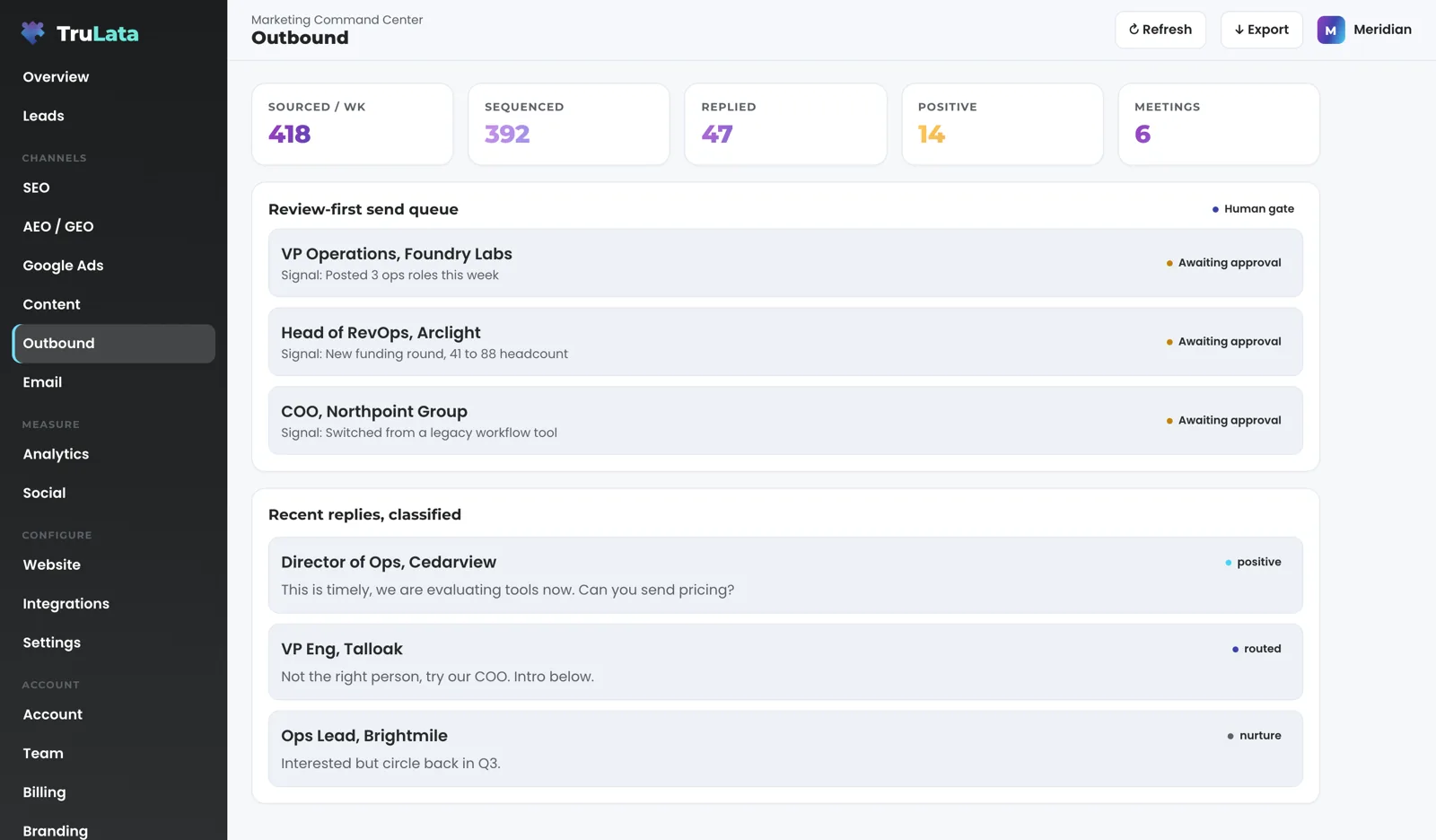
Every reply, matched and classified
- PositiveShown to your team the same day
- No, stop or unsubscribeSequence ends; the address is suppressed
- Bounce, or the person leftAddress retired; a person decides on a replacement
- Out of officeLeft in the sequence
- Sender-verification wallSurfaced for a person; the queue keeps moving

A real reply always reaches your team.
Do I decide who gets contacted?
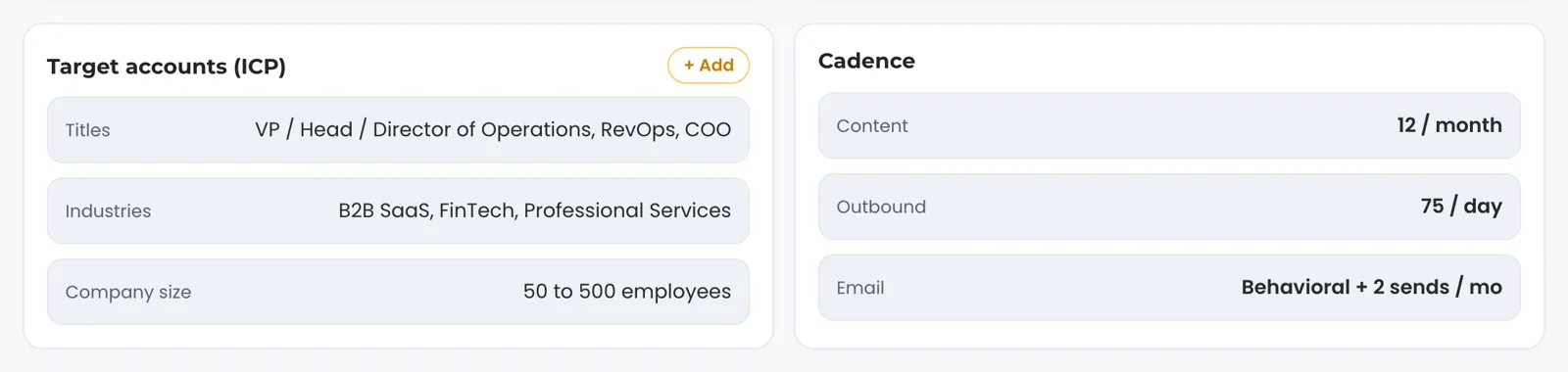
You do, through the target profile. It is set with you during setup: the titles, the industries, the company sizes and, where it matters, the region you want to reach. The Settings view shows the current profile as three lines, titles, industries and company size, beside a cadence card with the outbound rate, so the aim is always on the screen.
Change it from the screen. Add a segment from the target accounts card and the request lands with the team, logged, and the profile is updated for the next run. Ask to drop one and the request is logged the same way. Every change from the screen reaches the engine as a logged request to your team, which keeps the record complete.
Named accounts get their own path. Hand us the businesses you specifically want, and each is researched individually, opened with something true and specific about them, and posted for a person's review as it is queued. They travel their own path, apart from the weekly volume run.
Pause it when you need to. Ask through the targeting card and the request is logged like any other. A paused sequence holds everything: a run in progress stops cleanly, the queue waits and the follow-ups wait with it. Resume it and the queue picks up where it stopped, under the same daily cap.
Will it sound like me?
It sounds like the brief you set. Every opener is written to a fixed brief: four or five sentences, addressed to a named person at a named company, founder to founder, sharp, specific and warm. No 'hope this finds you well', no fluff, no emojis. It says in one line what you do and makes one low-friction ask. It carries no link; the ask is a reply. It makes no promise and projects no result; the person reading it is flooded with both.
One rule is enforced in code, not left to the model: a deterministic guard rewrites any em dash the model adds anyway, before the draft is stored. Every email is signed by the person whose mailbox it leaves from, and it ends with a footer that carries the sender's postal address and offers a one-word exit: reply no and no follow-up goes out. That footer is the promise the opt-out handling keeps.
Openers are short on purpose: one idea, one ask. Follow-ups take a different angle each time, so the second note reads as a new note rather than the first one sent twice, and each opens with something other than 'just checking in' or 'circling back'.
Change the voice from the Settings view. Edit the brand voice card and the request lands with the team, logged, and the brief is changed for the drafts that follow. A draft already in the queue keeps its text; the next run uses the new brief.
What it never writes
- Hope this finds you well
- A link, a promise or a projected result
- Just checking in, or circling back
What every opener carries
- Four or five sentences to a named person
- One line on what you do, one low-friction ask
- The sender's postal address and a one-word exit
Can I see every email that went out?
Yes. Every send is logged with the prospect, the company, the draft that went, the subject, the mailbox it left from and the moment it left. The time is stamped when the email actually goes out, not when the draft was written, so a draft that waited five days in the queue shows the day it shipped, and the daily cap counts sends rather than drafts. Every reply is logged with its classification, and a reply stops the follow-ups on that thread.
Follow one prospect through the record. The weekly run finds an operations lead at a company that fits your profile and is already running paid ads. Suppression clears the address: not a customer, not on the do-not-contact list, no email from you in 30 days. Enrichment returns a verified address. The opener is drafted to your brief, a subject is picked from the pool, the draft is assigned to the next mailbox in rotation, and the row appears in the queue as awaiting approval. Released at 9:15 on a Tuesday, the record stamps 9:15 on that Tuesday. Three days pass with no reply, so the next 8am Eastern check sends the first follow-up in the same thread, from a new angle. A reply of 'send me pricing' is matched to the thread, classified positive, shown to your team the same day, and every follow-up on that thread stops. A reply of 'no' would have suppressed the address instead, and the sequence would have ended there.
The stat row at the top of the view shows sourced this week, sequenced, replied, positive and meetings, and each opens. Below it sit the send queue and the recent replies, each reply with its class. The view refreshes when you open it: the page loads last night's snapshot first, fetches the live payload from a cache instantly, and runs a pull in the background when the snapshot is older than five minutes. Sends, replies and suppressions are live records; sourcing moves weekly.
Know what runs on a schedule and what stays with a person. Sourcing, suppression, enrichment, drafting, follow-ups and classification run on their own, whether anyone is at a desk. Releasing the queue is set per engagement: a person releases it with one click, or it releases on the schedule set for the engagement. A contact-form note and a replacement contact each wait for a person. The engine holds the repetition; a person holds those decisions.
Know the boundary. The engine reads the mailboxes set up for the engagement, to send and to catch replies; your business inbox and calendar stay yours, connected only where you ask for it during setup. Address lookups are capped at 150 a day by default, so a large list is worked through over days. A not-interested or bounced address is suppressed permanently, and every send leaves from a mailbox set up for the engagement.
One prospect, on the record
- FoundAn operations lead at a company already running paid ads
- ClearedNot a customer, not on the list, no email in 30 days
- ReleasedThe record stamps 9:15 on that Tuesday
- Follow-upSame thread, a new angle
- Send me pricingClassified positive; every follow-up stops
The engine holds the repetition; a person holds those decisions.
How does it connect, and what should I check in the demo?
Our team connects it during setup. You set the target profile with us. The mailboxes the engine sends from are set up for the engagement, and your customer list on the payment record and your do-not-contact list are loaded, so suppression is complete before the first run. Our team does the connecting, with access you grant, and we never ask for your account password.
Open the Outbound view on demo.trulata.com. It opens with your name and email. The company is fictional and every number is illustrative, but it is the same engine code every client runs.
Check four things. First, the stat row: sourced this week, sequenced, replied, positive, meetings. Second, one queue row opened: the signal that earned the email, the fit score, the draft marked ready and the status awaiting your approval. Third, the replies card: each reply carries its classification and a suggested action. Fourth, the Settings view: the target accounts card with titles, industries and company size, beside the cadence card with the outbound rate.
Those four are what your own screen shows once your first list is built, with your counts in place of the placeholders.
- Set the profileTitles, industries, company sizes and region, with us
- MailboxesSet up for the engagement
- Suppression loadedYour customer list and your do-not-contact list
- First runSourced, enriched, drafted, waiting in the queue
What the outbound engine reads and writes.
| What | Where it comes from | How fresh |
|---|---|---|
| Prospects | A business contact database, filtered to your target profile | Weekly |
| Suppression | Payment record, do-not-contact list, bounced and not-interested addresses | Before every run; permanent |
| Enrichment | Verified or likely-to-engage address; contact-form path where none, submitted by a person | At sourcing; 150 lookups a day by default |
| Drafts | Written per prospect to the brief set with you, dash guard applied | At sourcing, held in the queue |
| Sends | From the review-first queue, by a person or on the engagement's schedule | Live, logged with draft, mailbox and time |
| Follow-ups | Same thread, up to two, three days apart, stopped by a reply | Checked daily at 8am Eastern |
| Replies | Matched to the send, classified, shown to your team | Ten-minute sweep; 8:05am Eastern digest |
Prospect emails leave from a review-first queue; a person releases them, or the queue releases on the schedule set for the engagement, and every send is logged.
Questions, answered.
Does it send email on its own?
It can, per engagement. Prospect emails leave from a review-first queue; a person releases them, or the queue releases on the schedule set for the engagement, and every send is logged with the draft, the mailbox and the time.
How are prospects chosen?
By your target profile: the titles, industries and company sizes set with you. A weekly run sources businesses that match, removes anyone suppressed, and drafts only where a deliverable address exists, and only on a buying signal when that gate is on. Change the profile from the Settings view: the request lands with the team, logged, and the profile is updated for the next run.
What happens to replies?
Each is classified and shown to your team. A positive reply is shown the same day. An opt-out ends the sequence and suppresses the address. A bounce retires the address, and a person decides whether to source a replacement contact.
Will it email someone who said no?
A reply of no, not interested, unsubscribe or stop suppresses the address permanently and adds it to the do-not-contact list, so the sequence ends there, and each person gets at most one opener in 30 days in any case.
Can I write the openers myself?
You set the brief and the engine writes to it. Change the voice from the Settings view: the request lands with the team, logged, and the brief is changed for the drafts that follow. Named accounts you hand-pick get an opener researched and written individually and posted for a person's review as it is queued.
How many emails go out a day?
Up to the cap set per engagement, 30 a mailbox a day by default, paced 8 seconds apart. A run only prepares what the busiest mailbox can still take that day, and the cap counts emails sent rather than drafts written.
Do you need access to my inbox?
The engine reads the mailboxes set up for the engagement, to send and to catch replies. Your business inbox and calendar stay yours, connected only where you ask for it during setup.
How long does setup take?
Our team sets the target profile with you, sets up the sending mailboxes, and loads your customer list and do-not-contact list for suppression.
Which tier includes outbound?
Command. The full list of what each tier includes is on the pricing page.
See it running
before you decide.
The demo is the real product on a fictional company, with your name and email in front of it. Pricing is three published tiers.
Open the live demo See pricing
New here? See what TruLata is. Prefer to write? Send us the one thing you want to know.
Start here: AI marketing platform · AI marketing software · all-in-one marketing platform · marketing automation software · marketing software for small business.
- Refreshed when you open itLive data on page load, never a monthly PDF
- Counted from your own formsLeads recorded server-side, compared daily with Ads and GA4
- Seen in AI answersHow often ChatGPT, Gemini, Claude and Grok name you, measured
- Every send loggedProspect emails leave from a review-first queue, and every send is logged.