

Know what your ad spend bought, and who changed your account.
Your ads run on Google, Meta and ChatGPT, each built and changed through the platform's own API. Open the ads view and read spend, conversions and cost per conversion for every campaign, as fresh as Google publishes it. Every morning at 7:05 Eastern a watch reads your account's change history and its user list, and raises anything material to the team, as an interrupt or in the 8am digest.

Google, Meta and ChatGPT, run as one program.
Google Ads search is managed by our team on all tiers: budgets, bids, negatives, copy and structure. Meta ads are built and published through Meta's API on Growth and Command, with creatives made for your approval on Command.
ChatGPT ads are the newest channel: ads shown inside ChatGPT conversations, matched to what the person is asking about. Campaigns, ad groups and ads are created through OpenAI's ads API, and spend, clicks and cost per click are read from the same API. It is early, and fewer advertisers are bidding there than on Google.
Every platform writes to its own account, in your name, so each one keeps its own record of what changed and when.
One program, three platforms
- Google Ads search
- Meta ads
- ChatGPT ads
- Built and changed in your account, in your name
- Each account keeps its own record of what changed
What did each campaign spend, and what did it buy?
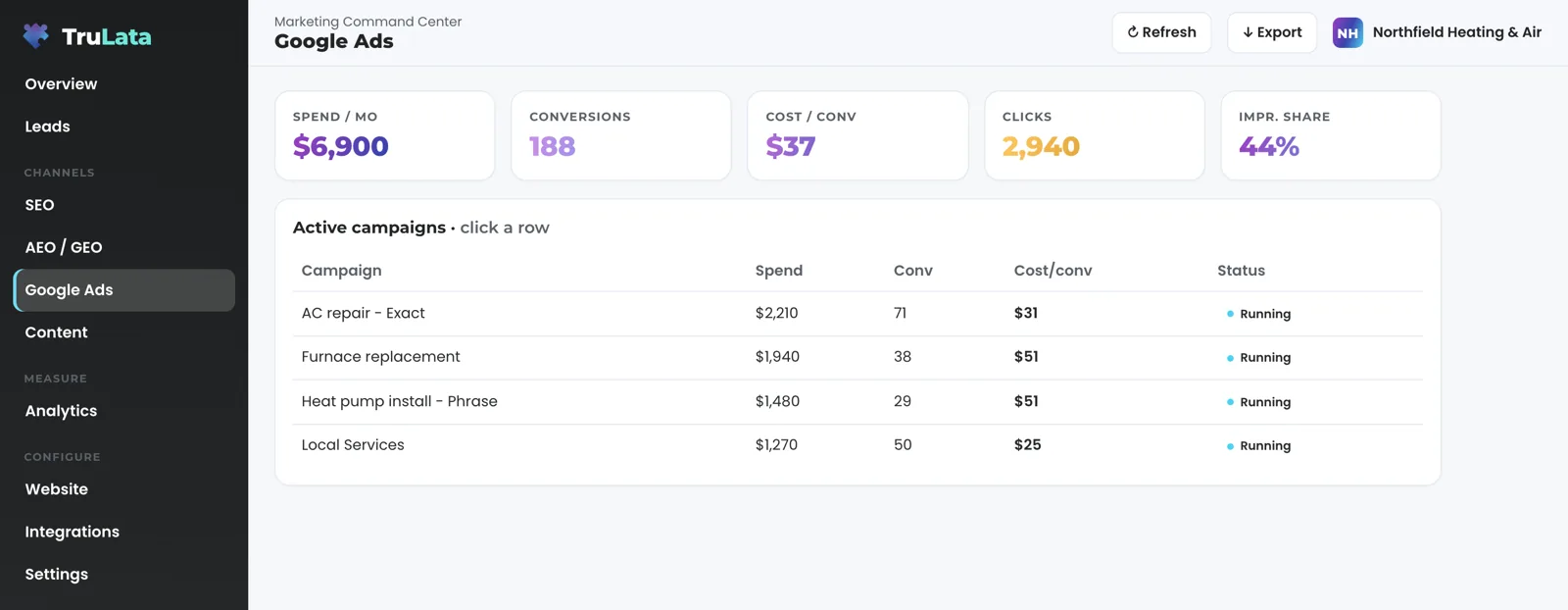
One row per campaign: spend, conversions, cost per conversion and status, with the account totals in a stat row above. Click a row and the campaign opens with its spend, conversions, cost per conversion, bid strategy and status. The totals are summed from the same campaign rows, so the number at the top and the table under it always agree.
Cost per conversion is calculated from the totals of the window rather than averaged across campaigns, so each campaign carries its true weight. With the date-range picker switched on for your instance, the view reads live from Google Ads for the window you choose and sets it beside the window before: cost per conversion, click-through rate and cost per click, each with its change. Conversions that span a tracking rebuild are marked not comparable, with a note on the page saying when and why, instead of a bare zero that reads like a collapse.
Conversions here are what Google counted. The Leads view holds what your forms counted, and the daily lead watch below says when the two disagree. Google publishes Ads performance a few hours after the fact; the view shows the newest point Google has released and the header stamp says how old it is. Press Export and the campaign table leaves as a CSV, for the range you picked.
Who changed my account, and when?
Every morning at 7:05 Eastern, one job reads four things from every account mapped to a TruLata dashboard: the change history, with what was edited, by whom and through which tool; the list of account users; the conversion actions and goals; and the campaign settings. Google's change history logs neither who was given access nor how conversions are counted, so the watch snapshots both and compares them with the previous run.
It sorts before it speaks. Our own API writes, Google's asset churn and negative-keyword hygiene are filtered out first. What remains goes through a fixed rule table. A third party changing a budget, a bid strategy, a network setting or the status of a spending campaign is an interrupt, and it reaches the team as soon as the run finds it. A geo or schedule change, new ad copy, or an ad group added or removed goes into the 8am digest. A third-party edit to a campaign or its budget that no rule recognises is reported as a finding in its own right.
Ordinary account churn stays out of your morning and a material change made by anyone else reaches the team the same day, which is why this is a watch and not a feed. A condition that persists, such as an AI setting still switched on, is reported once and held on a standing ledger until it clears, so a known problem is repeated only if it gets worse, or once every two weeks while it stands.
- Read four thingsChange history, account users, conversion actions and goals, and campaign settings, from every mapped account at 7:05am Eastern
- Set the churn asideOur own API writes, Google's asset churn and negative-keyword hygiene are filtered out first
- Run the rule tableA fixed rule for each kind of change, and a finding for a third-party edit no rule recognises
- Interrupt or digestBudget, bid strategy, network or status: to the team as the run finds it. The rest: the 8am digest

A material change made by anyone else reaches the team the same day.
What does it catch that a report misses?
Start with the changes nobody on your side made. Google can switch an AI-driven setting on by itself, applying a recommendation under the login of a user on your account, so the history reads as though somebody at your desk did it. That setting spends against your budget for as long as it stands. The watch names that class of change the morning after it happens, and it names it even when one of our own scripts is the actor, because that rule runs before any filtering.
Access is a blind spot of its own. The Ads change history has no event type for account access at all, so the watch reads the user list directly every morning, with each person's role, and compares it with yesterday's. A new grant inside the window is raised; a grant already on your acknowledged list is not. An address you did not add, a vendor's or an old agency's, reaches the team the next morning rather than whenever somebody thinks to look.
The same shape hides in cheaper places. A network setting flipped to Display or Search Partners spends without changing the budget figure anyone looks at. A bid strategy swap changes what the account spends without a budget edit. A campaign that used to spend gets deleted and vanishes from every report. Each has its own rule, and each rule is written to find a single edit inside a day of ordinary account churn.
What a spend report shows
- A budget figure that never moved
- A change stamped with the login of a user on your account
- A deleted campaign, gone from every report
What the watch names
- An AI setting Google switched on itself, the morning after
- A new address on the user list, against yesterday's list
- A network flip, a bid strategy swap, a deleted campaign: a rule each
Do Google's conversions match my real leads?
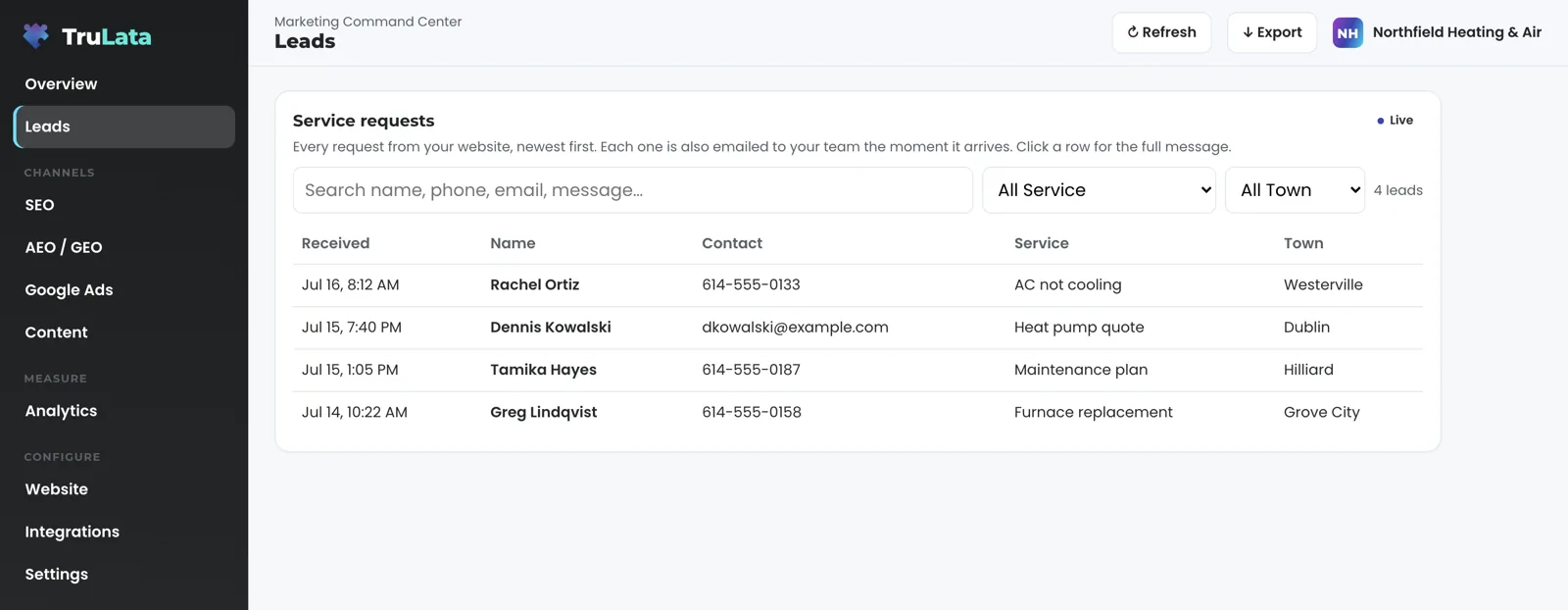
They are checked every day, not assumed. Your website's forms append each submission to a lead sheet server-side as it lands, and the Leads view reads that sheet newest first. Where your forms feed that sheet, a second job at 7:20 Eastern compares it against Ads conversions and GA4 events and raises the day they diverge.
Five checks, each named. Loader: the Google tag still loads and the live pages still carry the loader and the conversion label. Blind: leads in the sheet, zero GA4 form events. Ads blind: paid leads in the sheet, zero Ads conversions. Stalled: a campaign that was spending at least $50 has sat at zero for four days in a row. Silent: organic traffic continues and no leads at all arrived. An unchanged condition re-alerts at most once a week, so a known pause neither shouts daily nor goes quiet.
A tag can stop counting while your forms keep working, and the campaign that carried the leads then reads as the one to cut. The daily comparison keeps a budget decision off a broken number. The leads that landed are read against the conversions Google counted, every morning, so a dead tag, a blind ad account or a stalled form is flagged the next day instead of at the end of the quarter. The ads view is one of three counts, and the sheet is the one that counts a form on the server, with or without a browser tag.
Who makes changes, and what runs on its own?
The engine builds campaigns and creatives and publishes them through Google's and Meta's APIs, with approval on the Creative view where you want it. Budgets and bids move within the limits set for your engagement, and every change lands in your account's own change history. Google Ads search is managed by our team on all tiers: budgets, bids, negatives, copy and structure, each edit landing in the same change history the watch reads, so your own record shows what we did and when. Meta ads are managed on Growth and Command, and social media management, posts created and published for your approval, is on Command. Nobody is exempt from the record, including us: our own keyboard edits appear in the digest as attribution, so a client change the next day is read against what we did.
Three jobs run on a schedule whether anyone is at a desk. The 7:05 watch, above. The 7:20 lead watch, above. And a daily job that sets the location option to presence on every search and display campaign in the accounts we manage, so your ads serve to people physically in the area you target rather than to anyone Google decides is interested in it. That job touches that one setting: your location list, budgets and statuses stay as they are. It runs every day, so a campaign built later in the engagement gets the same treatment without anyone remembering to check it.
A request from the screen goes to your team as a logged ticket, and the engine's writes to your ad accounts go through Google's and Meta's APIs and land in each account's own change history. A keyword, category or targeting request made from the screen goes to the team and is logged; a person makes the edit in the account, and it appears in the next morning's history. Both paths leave a record you can read: the ticket your team logged, and the entry in your own account's change history.
Three jobs, every day
- Ads change watchChange history and user list, every mapped account
- Lead watchFive checks across your lead sheet, GA4 and Ads
- Location optionSet to presence on every search and display campaign we manage
- A request from the screenTo your team as a logged ticket
Nobody is exempt from the record, including us.
How do I connect it, and what should I try in the demo?
Grant access, never a password. Add our Google account as a manager on your Ads account, or link it under our manager account, from your own console, and revoke it there whenever you choose. Your part ends with the grant. Our team maps the account during setup, the first pull lands, and the change watch is running on your account before setup ends.
Open demo.trulata.com and click the Google Ads view. It is the same engine code every client runs, on a fictional company, and every number is illustrative. Try three clicks. Click a campaign row and confirm the drill-down opens with spend, conversions, cost per conversion and status. Click a stat card and confirm it names its window. Press Export and confirm the campaign table leaves as a CSV.
Then ask about your own account, which the demo stands in for. Ask which of your numbers are live and which lag, because the answer is per source: your CRM, Stripe, your booking platform, website leads and email statistics are live; Google Ads and GA4 lag hours; Search Console runs two to three days behind. The watch starts on your account during setup; ask what it found.

What the ads view reads.
| What | Where it comes from | How fresh |
|---|---|---|
| Campaign performance | Google Ads API, one row per campaign | Hours behind, set by Google |
| Account totals | Summed from the campaign rows | Hours behind |
| Change history | Google Ads change events, every mapped account | Read daily at 7:05am Eastern |
| Account users | Google Ads account access list, compared with the previous run | Read daily, because change events do not log access |
| Conversion actions and goals | Snapshot, compared with the previous run | Read daily |
| Lead comparison | Your server-side lead sheet vs Ads vs GA4 | Daily at 7:20am Eastern, where forms feed the sheet |
Google's change history has no event for an access grant, and a recommendation Google applies for you is stamped with the login of a user on your account, so the watch reads the user list and that setting directly, every morning.
Questions, answered.
How fresh are the ads numbers?
Hours behind, set by Google. The view shows the newest point Google has published and the header stamp says how old it is. Your CRM, Stripe and website leads on the same dashboard are live.
What does the daily watch look for?
Material changes made by anyone other than us: budgets, bid strategies, network settings, the status of a spending campaign, deleted campaigns, targeting and ad copy. It also flags AI Max or asset automation switched on by anyone, Google included, and any change to who can access the account or how conversions are counted. Our own API writes and routine noise are filtered out.
What time does it run?
7:05am Eastern, every day, on every account mapped to a TruLata dashboard. An interrupt reaches the team as the run finds it; everything else lands in the 8am digest the same morning.
Do you run my campaigns or just report on them?
Both. Google Ads search is managed on all tiers, Meta ads on Growth and Command, and social media management, posts created and published for your approval, is on Command. Budgets and bids move within the limits set for your engagement, and every change lands in your account's own change history. The view reports and the daily watch guards on every one of them.
Why compare Ads conversions with my leads?
Because a broken tag makes Ads report zero while real leads keep landing, and the campaign that carried them then reads as the one to cut. The comparison runs at 7:20am Eastern every day wherever your forms feed the lead sheet, so the two counts are read against each other the next morning rather than at the end of the quarter.
Can the dashboard change my campaigns?
Through your team and the engine. A request from the screen goes to your team as a logged ticket, and a person makes the edit in the account. The engine's writes to your ad accounts go through Google's API within the limits set for your engagement, and every change lands in your account's own change history.
Will I be told when something changes?
Yes. An interrupt reaches the team the morning the run finds it, a digest-tier change lands in the 8am digest, and every edit, ours included, sits in your own account's change history for as long as Google keeps it.
See it running
before you decide.
The demo is the real product on a fictional company, with your name and email in front of it. Pricing is three published tiers.
Open the live demo See pricing
New here? See what TruLata is. Prefer to write? Send us the one thing you want to know.
Start here: AI marketing platform · AI marketing software · all-in-one marketing platform · marketing automation software · marketing software for small business.
- Refreshed when you open itLive data on page load, never a monthly PDF
- Counted from your own formsLeads recorded server-side, compared daily with Ads and GA4
- Seen in AI answersHow often ChatGPT, Gemini, Claude and Grok name you, measured
- Every send loggedProspect emails leave from a review-first queue, and every send is logged.