

Keep your leads, your articles and your accounts, whether you stay or go.
TruLata reads accounts you already own, through access you grant and can revoke in your own consoles. Leads land in a sheet shared to you and each article in a Google Doc the moment it is made, so both are yours from the first day.

Which of my accounts do you read, and how do you get in?
Every connection is access you grant. Google Analytics 4, Search Console, Google Ads and your Business Profile are read through a manager invitation you add in each console and can remove there. Our team connects your CRM, Stripe, your booking platform and your email platform from the inside, with access you grant during setup, so your part ends with the grant. Any other system your business runs on with an API is connected the same way. Your website's forms reach the screen through the lead sheet your own site writes. We never ask for your account password.
Each source is read for specific things: sessions, sources, pages and key events from Analytics; queries, clicks and average position from Search Console; spend, conversions, cost per conversion and change history from Google Ads; reviews, rating and listing performance from your Business Profile; pipeline stages and sources from your CRM; payments and subscriptions from Stripe, read only; jobs from your booking platform; campaign statistics from your email platform.
Access comes first. Then comes the first pull, your baselines, your keyword set and the ads watch. After that come the content cadence, ads reports, email flows and goals.
Your inbox and your calendar stay private to you today, and your customers' card data stays with Stripe, never read by us; we read the payment record. Phone calls count through your CRM: a call it records as a lead is on the screen, and a call-tracking platform is connected during setup where your business runs on one.
Read, through access you grant
- AnalyticsSessions, sources, pages and key events
- Search ConsoleQueries, clicks and average position
- Google AdsSpend, conversions and cost per conversion
- Business ProfileRating, reviews and listing performance
- CRM, Stripe, booking, emailAccess you grant at setup; card data stays with Stripe
- Your website formsThe lead sheet your site writes
Where is my data stored?
Five places, and the two worth keeping are a Google Sheet and a Drive folder. Your dashboard snapshot is served from a managed cloud service. Your lead rows live in a Google Sheet your own website appends to, shared to you. Your content is filed as a Google Doc per piece in a Drive folder kept for your account, and the folder can be shared to an address you name. Your connection map, which account is which, is one record per client with us. Lead outcomes and screen requests sit server-side behind the same gate.
A copy of your numbers ships with the page. At 12:01am Central one job bakes a fallback snapshot for every client and deploys it with the dashboard, so there is something to read the instant it opens. A failed pull or a failed syntax check leaves the previous page up, so there is always a page to read.
The two worth keeping are the sheet and the folder, and both are shared to you from the first day.
How old is the number I am looking at?
As old as the stamp beside the title says. The page paints last night's snapshot before any network call returns, then fetches the live payload from a cache. If that payload is older than five minutes, a pull of your sources starts behind the page and the numbers swap in when it lands. Ten people opening at 9am cause one pull.
Hover the stamp and it says one of two things: pulled live when you opened this page, or live refresh unreachable, showing the last saved snapshot. The age of the data is always on the screen.
Refresh starts a real pull, 2 seconds to a little over 3 minutes depending on which accounts you connect, and the page reloads when the stamp moves. Every path through it ends in a reloaded page whose stamp says how old the data is, a slow source or a timeout included.
Each source sets its own ceiling. Your CRM, Stripe, your booking platform, website leads and email statistics read live. Google Ads and Analytics intraday figures run hours behind. Search Console publishes two to three days after the fact. Meta reports on Meta's schedule. A refresh moves what can move.
On open
- Last night's snapshotOn the screen before any network call returns
- The live payloadFrom cache
- A pull runs behind the pageFresh numbers swap in when they land
- A real pull2 seconds to a little over 3 minutes, then a reload
As old as the stamp beside the title says.
Who can see my numbers?
People who hold a seat on your account, and the TruLata team that runs it. Nobody else. Your dashboard has its own address, and a sign-in for one account is refused on another. Two checks run before a byte is served: your sign-in confirms who they are, and our seat list confirms they belong on this account. Sign-in is a single-use link from login.trulata.com sent to the address on the seat.
Take a new office manager. Open the Team view, type their email, choose Member or Admin, press Invite member; only the owner or an Admin can. When they leave, press Remove beside their address; within 30 seconds every request from it gets a refusal page. The view shows seats used of plan seats and says so when the plan is full. Seats by plan: three on Starter, three on Launch, ten on Growth and unlimited on Command.
Your dashboard is yours alone. A login minted for one dashboard and presented to another is refused. Before every deploy, a preflight checks that only your name appears anywhere in your instance. Preview hostnames do not serve your dashboard, so every path leads through the gate.
If our seat service is slow to answer, you stay in. A person already signed in to your account is allowed through and the decision is logged, so you stay in through a blip on our side. Two refusals hold in every case: a wrong audience and a login with no email identity.
Refused, every time
- Another client's login
- A sign-in minted for a different dashboard
- A removed seat, within 30 seconds
Who can see your numbers
- People who hold a seat on your account
- Invited by email, as Member or Admin
- The TruLata team that runs it
Can anything on the screen change my accounts?
Through your team and the engine. Every change the screen can make is logged, and this is the list today: seats (invite and remove), plan and billing, which Google accounts it reads and the keys for the tools you connect, your settings including any autopilot you switch on, a lead outcome on your own lead record, approving or publishing an article, approving an ad or asking for changes where your plan includes creative, and a request to our team. Ask TruLata can take the same actions, and pause, enable or change the budget of a Google Ads campaign, each after your yes. Everything else on the screen reads, and the engine's writes to your ad accounts and your site go through each platform's API and land in the account's own change history.
A lead outcome is the one write to your own data. On the Leads view, mark a row Not a lead, choose why (existing customer, spam or sales pitch, wrong number, out of area, other), and it is written to that lead's record. The label stands until your team clears it; flagged Local Services leads queue for Google refund disputes. Where follow-up is on, your staff mark contacted, quoted, won or lost on the same record, and a lead with no mark after two days wears a badge that says so.
A request goes to a person. It lands with your TruLata team with a ticket number, logged with who sent it, and a person makes the change in the account that holds it. Stripe is read only. Budget and bid changes are made within the limits set for your engagement and land in your account's own change history, and the change watch reads them the next morning.
- Ask a questionIn the assistant view, where it is offered
- Set a lead outcomeThe one write to your own data, with undo on the row
- Request a changeTo your team, logged, with a ticket number
- Ads and your siteChanged by the engine through each platform's API, in its change history
What does the assistant see when I ask it a question?
Your question and your own dashboard's snapshot. Ask TruLata is on every dashboard. Your conversation, each message capped at 2,000 characters, goes to a model API with your dashboard's numbers, your account's state (plan, seats, connections, open tickets) and our help guides, for your account alone. When you say yes to an action, it takes that action and logs it.
Ask TruLata is on every dashboard, and it answers from your own numbers and your account's state.
What the assistant sees
- Your question, up to 500 characters
- Your own instance's snapshot
- An answer read from your own numbers
What runs when nobody is at a desk, and what waits for a person?
Five jobs run on a schedule whether anyone is at a desk. At 12:01am Central the fallback snapshot is baked for every client. At 7:05am ET the ads change watch reads your Google Ads change history, which Google keeps for 30 days, and the account's user list, because a change event does not record who was granted access. At 7:20am ET, on an instance whose forms feed the sheet, the lead watch runs five checks: the tracking loader serves, website leads are counted, paid leads reach Google Ads, no campaign has gone dark, the form has not gone quiet. Where the content engine runs, on Launch, Growth and Command, topics pass a demand gate on real search volume and each piece is filed as a Google Doc in a Drive folder kept for your account; approval before publishing is a per-client setting. Where the outbound engine runs, on Command, prospects are sourced weekly to your target profile.
The lead watch catches one shape of failure. Where your forms feed the sheet, the leads that landed are checked every morning against the conversions Google counted, so a dead tag, a blind ad account or a stalled form is flagged the next day rather than at the end of the quarter. The watch reads the sheet because a form submission is a fact and a tag firing is not.
What is logged for a person: budget and bid changes stay within the limits set for your engagement and land in your ad account's own change history, and every change request from the screen reaches your team as a ticket. Prospect emails leave from a review-first queue; a person releases them, or the queue releases on the schedule set for the engagement, and every send is logged with the draft, the mailbox and the time. Replies are classified and shown, and not-interested or bounced addresses are suppressed from further sends.
Scheduled, and not
- Nightly bakeA fallback snapshot for every client
- Ads change watchChange history and the user list
- Lead watchFive checks, where forms feed the sheet
- Review-first queueProspect emails, every send logged
- Budgets and bidsWithin your engagement's limits, in your change history
What happens to my data if I stop?
You keep everything worth keeping, because it was filed as it was made. Your content is a Google Doc per piece in the Drive folder kept for your account, shared to an address you name when you go. Your leads are in the sheet your own site writes, which is shared to you, and the sheet is shared to an address you name.
Leaving is three actions. Remove our manager access on your Analytics property, your Search Console site, your Ads account and your Business Profile, where you granted it. Tell us the date. We empty your seat list, so no sign-in link works against your dashboard. Every tier is month to month, so the term ends when you say, unless you took the annual commitment.
Your folder and your sheet are already shared to you, so leaving takes an address rather than an export. The snapshot on our service is a rendering of your accounts, and your accounts are still yours.
What stops
- Our manager access, removed in each console
- Your seat list, emptied
- The snapshot, no longer served
What you keep
- Your Drive folder, a Google Doc per piece
- Your lead sheet, already shared to you
- Your accounts, which were always yours

Leaving takes an address rather than an export.
What should I check before I buy?
Open demo.trulata.com and check four views. It opens with your name and email, the company is fictional, every number is illustrative, and the code is the same engine every client runs.
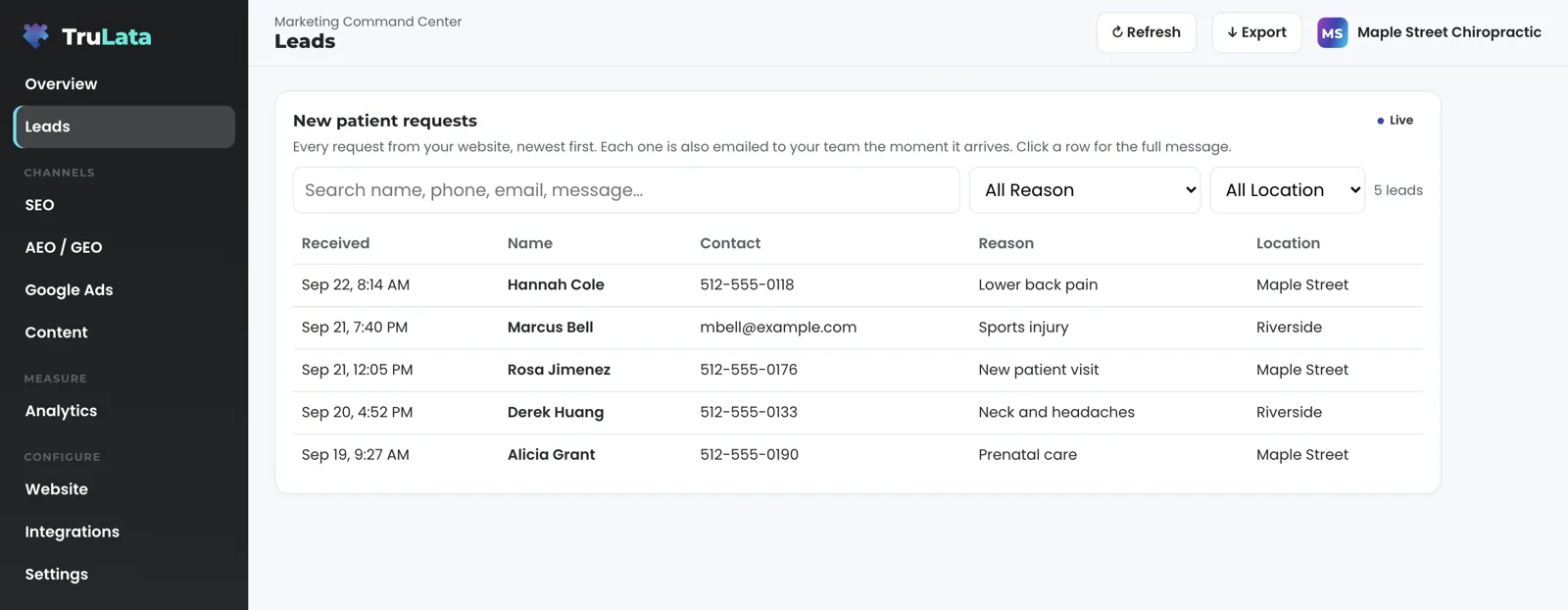
Leads. Rows arrive newest first, and each one is also emailed to your team the moment it arrives. Click a row for the message, the phone, the email and the page it came from. On your instance the view reads the sheet your site writes, shows the newest 200 and hides our own test submissions.
Integrations. On the demo every source shows Connected or Connect. On your instance the view lists what is connected, and a new source joins the list as it is connected.
Team, then Website. Team shows seats used of plan seats, the invite box and the roles Member and Admin. On Website, fill the Request a website change box and press Send to your TruLata team; the demo says it would go to your team in a live account, and your instance answers with a ticket number. Those boxes, the request buttons on the other views and the outcome control on Leads are the write surface, and each one reaches a person or the lead record. Ten minutes covers it.
Your data, in one table.
| What | Where it lives | When you leave |
|---|---|---|
| Dashboard snapshot | Managed cloud service, with a nightly fallback copy shipped with the page | No longer served once your seat list is emptied |
| Lead rows | A Google Sheet your site appends to, shared to you | Shared to an address you name |
| Content | Google Docs in a Drive folder kept for your account | Shareable to an address you name |
| Connection map | With us, one record per client | Points at access you removed in each console |
| Google account access | Manager invitations you grant | Removed by you, in each console |
| Card data | With Stripe, which holds the cards | Never read by us |
Every article is a Google Doc and every website lead is a row in a sheet shared to you from the moment it exists, so leaving means taking the folder and the sheet, not negotiating an export.
Questions, answered.
Do you read my email?
Your inbox and your calendar stay private to you; today the screen reads campaign statistics from your email platform. Mail you get from us includes the notice your own form handler sends your team when a lead arrives and the single-use sign-in link for a seat.
Where are my leads stored?
In a Google Sheet your own website appends to, shared to you. The Leads view reads it newest first, and your team is emailed each submission the moment it lands.
Can another client see my dashboard?
Your dashboard is yours alone. Each dashboard has its own address, and a login for one dashboard presented to another is refused, and a preflight before every deploy checks that only your name appears anywhere in your instance.
What does the assistant send to the model?
Your conversation, each message capped at 2,000 characters, with your dashboard's numbers, your account's state and our help guides, for your account alone.
Can you change my ad account or CRM from the dashboard?
Through your team and the engine. A request from the screen goes to your team as a logged ticket, and a person makes the change in the account that holds it. The engine's writes to your ad accounts and your site go through their APIs, budget and bid changes stay within the limits set for your engagement, and every change lands in the account's own change history.
How do I know how old a number is?
Read the stamp beside the title. It shows the time of the pull on screen, and hovering it says whether the numbers were pulled live when you opened the page or the live refresh was unreachable and you are reading the last saved snapshot.
What do I keep if I leave?
The Drive folder of your content and your lead sheet, both shareable to an address you name, and your own accounts with our manager access removed by you in each console. Both are already shared to you, so leaving takes an address rather than an export.
Do you hold card data?
Stripe holds it, and we never read it. We read payment records, and the connection is read only.
See it running
before you decide.
The demo is the real product on a fictional company, with your name and email in front of it. Pricing is three published tiers.
Open the live demo See pricing
New here? See what TruLata is. Prefer to write? Send us the one thing you want to know.
Start here: AI marketing platform · AI marketing software · all-in-one marketing platform · marketing automation software · marketing software for small business.
- Refreshed when you open itLive data on page load, never a monthly PDF
- Counted from your own formsLeads recorded server-side, compared daily with Ads and GA4
- Seen in AI answersHow often ChatGPT, Gemini, Claude and Grok name you, measured
- Every send loggedProspect emails leave from a review-first queue, and every send is logged.