

Know what Facebook and Instagram are doing, next to your search, ads and leads.
Share your Facebook Page once and its audience and engagement, plus the Instagram account linked to it, land on the dashboard you already open. The connection reads your numbers. Posting, where we run it, goes through your scheduler under the approval setting you chose, and ads are approved in their own view.
What will I see from Facebook and Instagram?
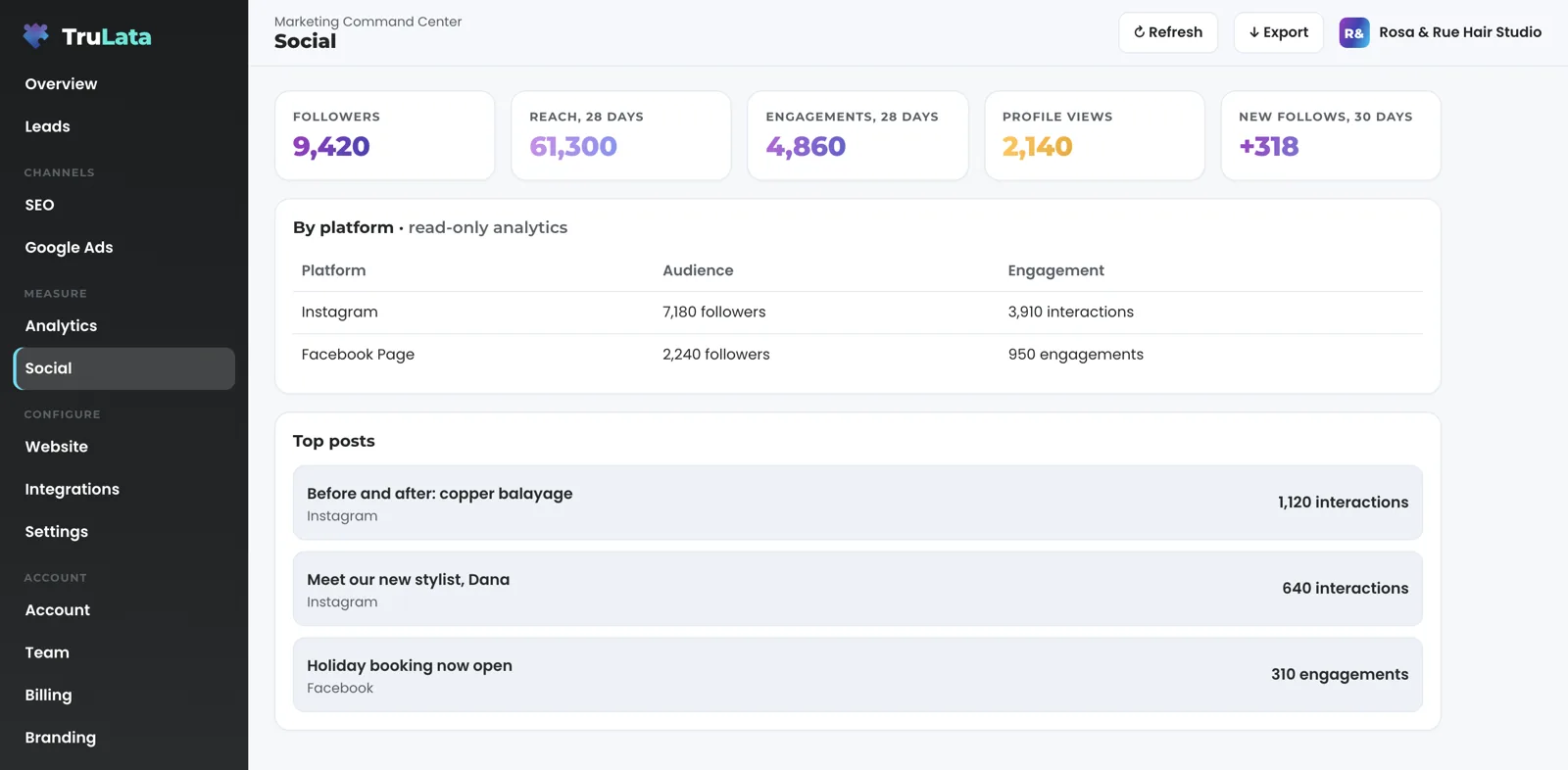
Audience and engagement for your Facebook Page and the Instagram business account linked to it, on one screen. From the Page: followers, post engagements, page views and post reactions over a 28-day window, plus new follows over a 30-day organic window. From Instagram: followers, post count, reach, views, profile views, accounts engaged, total interactions, likes, comments, shares, saves, website clicks and new follows. Each platform gets its own row on the read-only social view, and each row opens to its own figures. You see it whether or not we manage your posting; the view is for the whole picture, not the part we touch. Top posts sit underneath, pulled from Instagram's own post list or from the scheduler your posts went out through. Ad spend, reach, impressions and clicks belong to the ad account, not the Page. Where you have shared an ad account, we read them into our reporting today, and they arrive on the dashboard as that view is built.
Meta retires metric names from time to time. We request each metric on its own, so a metric Meta has stopped publishing drops off and the rest of the pull completes. A blank figure means Meta did not return it, not that something failed quietly.
A blank figure means Meta did not return it, not that something failed quietly.
How do I connect my Facebook Page?
Share the Page into our Meta Business Manager. Where we already run your ads, it is done. You share the Page and the Instagram account linked to it; our team connects the Page on your account during setup, and the social view appears once it is connected. We never ask for your account password. The access lives on Meta's side, where you granted it, so you can withdraw it there whenever you choose. We collect it in the first setup week, alongside the Google manager invitations, so the first pull has something to read.
The connection is done for you. Once linked, it is listed in the Integrations view with its status, and a Page that is briefly unreadable leaves the previous snapshot in place until the next pull.
- Share the PageInto our Meta Business Manager, with the Instagram account linked to it
- We connect itDuring the first setup week, beside the Google invitations
- It is listedIn the Integrations view, with its status
- Withdraw any timeOn Meta's side, where you granted it
How fresh are the Meta numbers?
As fresh as Meta's insights when the pull runs. The dashboard re-reads Meta when you open it and the snapshot is older than five minutes, and a fallback snapshot bakes every night at 12:01am Central, so the Meta section is read at least once a day. The insights inside that pull arrive on Meta's schedule, not ours. The header stamp says when the data was pulled, so you read the time behind every number. The page that defines live per source lists Meta as on Meta's schedule. Press Refresh in the topbar and a fresh pull starts; the page reloads when the stamp moves, and every path through it ends in a reloaded page whose stamp says how old the data is.
When Meta is read
- The snapshot, then a pullWhen the snapshot is older than five minutes
- A fresh pullThe page reloads when the stamp moves
- Nightly fallback bakeSo the Meta section is read at least once a day
- The insights themselvesArrive when Meta publishes them

Know what Facebook and Instagram are doing, next to your search, ads and leads.
Is this where my ads get approved?
Approvals live in a separate, per-client view that appears where we run paid social creative for you. The Meta connection reads; the creative queue is where you decide. Each ad draft shows its image, headline and body, with Approve or Changes requested and room for a note. The client is pinned server-side, so each dashboard reads its own drafts alone. An ad runs after you approve it, or, where a run date is set, after that date passes with no objection from you. Ask us to stop an ad from the same screen at any time, even after it starts.
The approval queue appears where we run social ads for you, and it stays its own screen, apart from your social numbers.
Two screens, two jobs
The Meta connection reads
- Audience and engagement
- Labelled read-only on the screen
- Shown whether or not we manage your posting
The creative queue is where you decide
- Each ad draft with its image, headline and body
- Approve, or Changes requested with a note
- Stop an ad from the same screen, even after it starts
Can the connection post to my Page?
The Page connection reads. Every request the dashboard makes through the Meta access is a read, and the social analytics are labelled read-only on the screen. Where we run your ads, your decision on the creative view writes to the ad's record, and an approved ad is published to your ad account through Meta's API on its run date. Where we run your social posting, posts go out through your own scheduler under the approval setting you chose. Every Monday morning a check verifies that each token is still valid, is more than two weeks from expiry, and carries read permission on your Page rather than posting permission. Anything off reaches our team the same morning.
Every Meta read can be switched off on our side in one step, without touching your Page.
What the Meta connection reads.
| What | Where it comes from | How fresh |
|---|---|---|
| Facebook Page | Page insights: followers, engagements, page views, reactions, new follows | Meta's schedule; 28 and 30 day windows |
| Insights on the linked business account: followers, reach, views, interactions, saves, website clicks, new follows | Meta's schedule; 30 day window | |
| Top posts | Instagram's post list, or the scheduler the posts went out through | On each pull |
| Creative approvals | Separate per-client view; your decision recorded against the ad | Live, where we run paid social |
| Connection health | Token validity, expiry and permissions | Every Monday |
| Posting | Through your own scheduler, where we run your social, under the approval setting you chose | Where set up |
The dashboard re-reads Meta when you open it and again every night, and the header stamp says when the data was pulled, so you read the time behind every number.
Questions, answered.
Does it read Instagram as well as Facebook?
Yes. The Instagram business account linked to your Facebook Page is read alongside it: followers, reach, views, interactions, saves, website clicks and new follows.
Do I have to give you a login?
You share the Page into our Business Manager, which is already done where we run your ads. Our team connects it from there, and we never ask for your account password.
Can it post to my Page?
The Page connection reads. Where we run your ads, the writes we make on Meta's side go to your ad account. Where we run your social, posting happens through your own scheduler under the approval setting you chose, and some clients approve each post there before it goes out.
How fresh are the numbers?
On Meta's schedule. The dashboard re-reads them when you open it and the snapshot is older than five minutes, and again every night at 12:01am Central. The header stamp says when the data was pulled.
Why is there no Creative tab on my account?
It appears once we run paid social creative for you. It is a separate per-client view, switched on with that work, apart from the Meta read.
What happens if Meta drops a metric?
It drops off and the rest of the pull completes. Each metric is requested on its own, so a metric Meta stops publishing drops off by itself and the others keep reporting.
See it running
before you decide.
The demo is the real product on a fictional company, with your name and email in front of it. Pricing is three published tiers.
Open the live demo See pricing
New here? See what TruLata is. Prefer to write? Send us the one thing you want to know.
Start here: AI marketing platform · AI marketing software · all-in-one marketing platform · marketing automation software · marketing software for small business.
- Refreshed when you open itLive data on page load, never a monthly PDF
- Counted from your own formsLeads recorded server-side, compared daily with Ads and GA4
- Seen in AI answersHow often ChatGPT, Gemini, Claude and Grok name you, measured
- Every send loggedProspect emails leave from a review-first queue, and every send is logged.