

One screen instead of five consoles. Every account still yours.
You run a local service business, and the marketing happens after the last job. TruLata takes the nightly checking and the scheduled work off your evening and leaves your accounts in your hands.

Is this built for a business like mine?
It is built for the owner whose nine o'clock looks like this. The laptop opens on the same five tabs as last week. Analytics, to see whether traffic moved. Ads, to see what the week cost. Search Console, to see whether the new page has impressions yet. The Business Profile, to see whether the last review was answered. The CRM, to see which enquiries became quotes. Each has its own login, its own date picker and its own idea of what a conversion is. None of them answers the one question that matters: which channel produced the jobs that paid. So you join them by hand, late, from memory.
This page is for the owner who runs the marketing: you sell a service, in one territory or across many, and the marketing is yours after hours. If that is you, TruLata is built for you, and a business with a marketer on staff reads the same screen. The nine o'clock routine is not a failure. It is what happens when the person who runs the company is also the one person who can answer the question.
Nine o'clock, five tabs
- Analyticsdid traffic move
- Google Adswhat did the week cost
- Search Consoleany impressions on the new page yet
- Business Profilewas the last review answered
- Your CRMwhich enquiries became quotes
None of them answers the one question that matters: which channel produced the jobs that paid.
What do I open instead of five tabs?
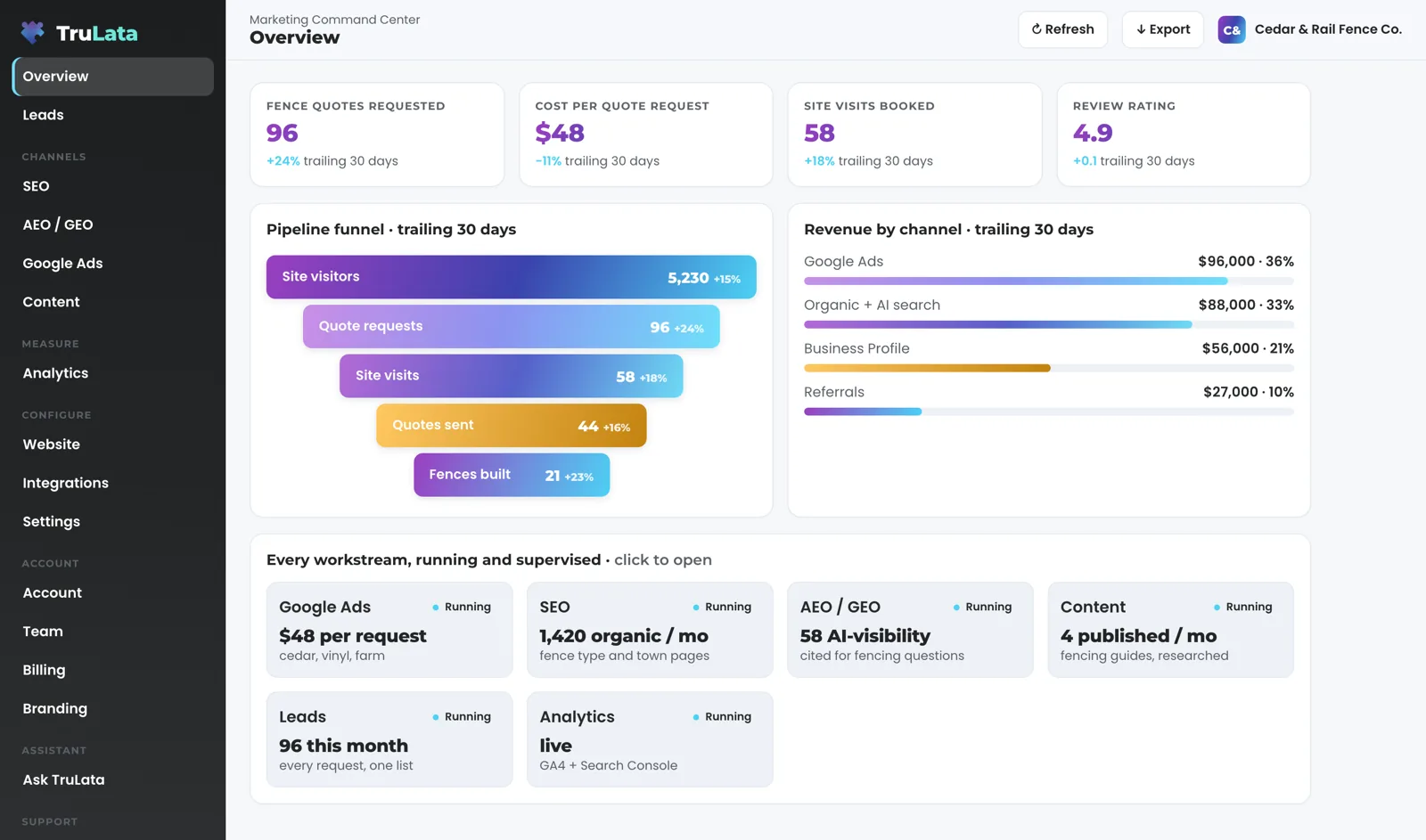
Open one dashboard at your own address on trulata.com, behind your own login. The Overview carries the headline numbers, the pipeline funnel, revenue by channel where revenue is connected, and a tile for every workstream. Click any headline number and it opens to its window, with a note naming the source it was pulled from. Behind the Overview, each view reads the console it replaces: Analytics for sessions, sources, pages and key events; Search Console for queries, impressions, clicks and average position; Google Ads for spend, conversions and cost per conversion; the Business Profile for reviews, rating and listing performance; your CRM, whichever you run, for pipeline stages and sources; Stripe for payments; your CRM or booking platform for jobs where your business runs on it.
It refreshes because you opened it. The page paints last night's snapshot first, fetches the live payload from cache, and runs a pull behind the page when that is older than five minutes. The header stamp says when the data was pulled. Press Refresh and a full pull starts; the page reloads when the stamp moves. Every path ends in a reloaded page: if the live service is slow to answer, you read last night's numbers and the stamp says so. Freshness depends on the source. Your CRM, Stripe, your booking platform, website leads and email statistics are live. Google Ads and GA4 lag by hours. Search Console runs two to three days behind. How the refresh works has its own page.
How do I get something changed without a meeting?
Ask from the screen. Beside the thing you want different there is a button: a website change, an extra post, a new content category, a keyword you want targeted, a change to the target profile the outbound engine sources from. Each opens a short box. Describe the change and it goes to your team, logged with the topic and who sent it. Each request becomes a numbered ticket in the Support tab. A request takes a minute, from the screen, at nine o'clock.
Every request goes to a person, not to your accounts. A request from the screen goes to your team as a logged ticket; the engine's writes to your ad accounts and your site go through their APIs and land in each account's own change history. What the screen can write is short: a lead outcome, to the lead record; a request, to the team, logged; and a question in the assistant view, where it is offered. The security page carries the list so you can check it.
- Press the button beside itA website change, a post, a category, a keyword, a target profile
- Describe the changeIn a short box, in your own words
- It goes to your teamLogged with the topic and who sent it
- You get a ticket numberIn the Support tab
What stays my decision?
The settings that govern what goes out are agreed with you, and every send is logged. Prospect emails leave from a review-first queue; a person releases them, or the queue releases on the schedule set for the engagement, and every send is logged. The engine sources prospects weekly to the target profile agreed with you and parks every draft in that queue. Content approval is optional and auto-publish is a per-client setting, so a piece waits for you or goes out on the agreed cadence, and which one is a per-client setting agreed with you. When a lead lands, you set its outcome from the screen and it is written to the lead record. The count of real leads is yours, not the ad platform's.
Access stays yours too. Every Google connection is a grant you give from your own console and can revoke there. We never ask for your account passwords. Our team connects your CRM, Stripe, your booking platform, your email platform, and your website forms from the inside, with access you grant during setup. Your inbox and calendar stay outside the screen today and connect during setup where your engagement calls for them. A phone lead counts where your CRM records it, and a call-tracking platform with an API is connected during setup where you use one.
Still the owner's call
- Prospect emailsA review-first queue; every send logged
- ContentApproval optional; auto-publish agreed per client
- Lead outcomesSet by you, from the screen
- Manager accessGranted and revoked by you
- PasswordsNone held

Access stays yours too.
What gets done while I am on a job?
The work you never reached at nine o'clock runs on a schedule, whether anyone is at a desk. Where the outbound engine is in your plan, it sources prospects weekly to your target profile and parks drafts for review; replies are classified and shown, and not-interested or bounced addresses are suppressed from further sends. Where the content engine is in your plan, it takes each topic through a demand gate on real search volume and how occupied the results already are, researches with current sources, writes, and files the piece as a Google Doc in your own Drive with a generated featured image. Your visibility in ChatGPT, Gemini, Claude and Grok is scored at baseline and re-run as the program moves.
Two watches run each morning. At 7:05 Eastern the ads change watch reads your account's change history and sorts it into our own writes, routine noise and material changes made by anyone else, including recommendations Google applied on its own. It reads the account's user list directly, because a change of access is not logged as a change. At 7:20 Eastern, on an instance whose forms feed the lead sheet, the lead watch runs five checks across your site's tag, GA4, Ads and Search Console, so a broken tag is raised the next morning instead of running silently for weeks. The ads watch and the lead ledger each have a page.

How much of my time does setup take?
A few minutes per console, then very little. You add our Google account as a manager on your Analytics property, your Search Console site, your Ads account and your Business Profile. The manager invitations are your whole part; our team connects the rest from the inside with the access you grant, and a connector we have not built yet is built during setup. Then the first pull fills the Overview, the answer-engine baseline runs, the keyword set is agreed and the ads watch starts on your account. After that the content cadence, ads reports, email flows and program goals are set. And the step-by-step detail says what is needed from you at each step.
On the published tiers: Starter is $400 a month, Launch $650, Growth $1,200, and Command is scoped per engagement. Every tier is one flat number, month to month. The pricing page lists what each one includes, row by row. Add a managed strategy retainer, scoped with you, on any tier. When the owner's chair needs a strategist beside it, the fractional CMO service is the agency counterpart.
A few minutes per console
- Analytics
- Search Console
- Google Ads
- Business Profile
- The first pull fills the Overview
- The answer-engine baseline runs
- The keyword set is agreed
- The ads watch starts
Everything you can do from the screen, and where each action lands.
| What you do | What happens | Where the change is made |
|---|---|---|
| Set a lead outcome | Written to the lead record, with a category and a note | The lead record on our service |
| Request a website change | Goes to your team, logged | Your site, by your team through its own API, from the ticket |
| Request content, a keyword or a category | Goes to your team, logged | Your content settings, by your team, from the ticket |
| Request a targeting change | Goes to your team, logged | The outbound engine's target profile, by a person, from the ticket |
| Invite a teammate | From the Team view: the invite goes to your team, who set up the seat; seats count against your plan | Your seat list |
| Click Refresh | A full pull starts; the page reloads when the stamp moves | Your snapshot, refreshed |
Every click on the screen reads or requests. A request goes to your team as a logged ticket; the engine's writes to your ad accounts and your site go through their APIs and land in each account's own change history. Your inbox, calendar and call tracking stay outside the screen today and connect during setup where your engagement calls for them.
Questions, answered.
Do I still need to log into Google Analytics and Google Ads?
The screen replaces the checking. Each view reads its source through the manager access you granted, and each figure opens to its window with a note on the pull. Your consoles stay yours, and a change in your Ads account lands in its own change history, which the watch reads every morning.
Can I change something in my campaigns from the screen?
You can request it, and the request is logged. Website, content, keyword, category and targeting changes go to your team. A request from the screen goes to your team as a logged ticket; the engine's writes to your ad accounts and your site go through their APIs and land in each account's own change history.
Will anything go out to customers or prospects without me?
Only through a queue, a schedule and a log. Prospect emails leave from a review-first queue; a person releases them, or the queue releases on the schedule set for the engagement, and every send is logged. Content approval is optional and auto-publish is a per-client setting, so a piece publishes without you only where that setting was agreed with you.
How fresh is what I see at night?
Live for your CRM, Stripe, your booking platform, website leads and email statistics. Google Ads and GA4 lag by hours, and Search Console runs two to three days behind. The header stamp says when the data was pulled, and Refresh forces a new pull.
Does it count phone calls?
Where your CRM records them. A call-tracking platform with an API is connected during setup where you use one, and your inbox and calendar stay outside the screen today and connect during setup where your engagement calls for them. Form leads are counted server-side from your own forms as they land.
What does it cost me in time to set up?
A few minutes per Google console to send manager invitations, then the keyword set, target profile and goals agreed with your team in weeks two to four. Our team connects your CRM, Stripe, your booking platform, ActiveCampaign and forms from the inside.
See it running
before you decide.
The demo is the real product on a fictional company, with your name and email in front of it. Pricing is three published tiers.
Open the live demo See pricing
New here? See what TruLata is. Prefer to write? Send us the one thing you want to know.
Start here: AI marketing platform · AI marketing software · all-in-one marketing platform · marketing automation software · marketing software for small business.
- Refreshed when you open itLive data on page load, never a monthly PDF
- Counted from your own formsLeads recorded server-side, compared daily with Ads and GA4
- Seen in AI answersHow often ChatGPT, Gemini, Claude and Grok name you, measured
- Every send loggedProspect emails leave from a review-first queue, and every send is logged.