
 ™
What Addy remembers about your business
The owner or an admin tells Addy something once, like "we never discount in ads", and every teammate's Addy follows it. See what she remembers under What Addy remembers on Settings.
#Tell her once
When the owner or an admin says something lasting in the chat, the way you would brief a new hire ("we only do kitchens and baths", "send roofing inquiries to Oak Hills Roofing", "never mention price in a review reply"), Addy saves it for the account and follows it from then on, in every answer, draft and change.
A member's chat does not save to the account. If you are a member, ask the owner or an admin to tell Addy.
#See what she remembers
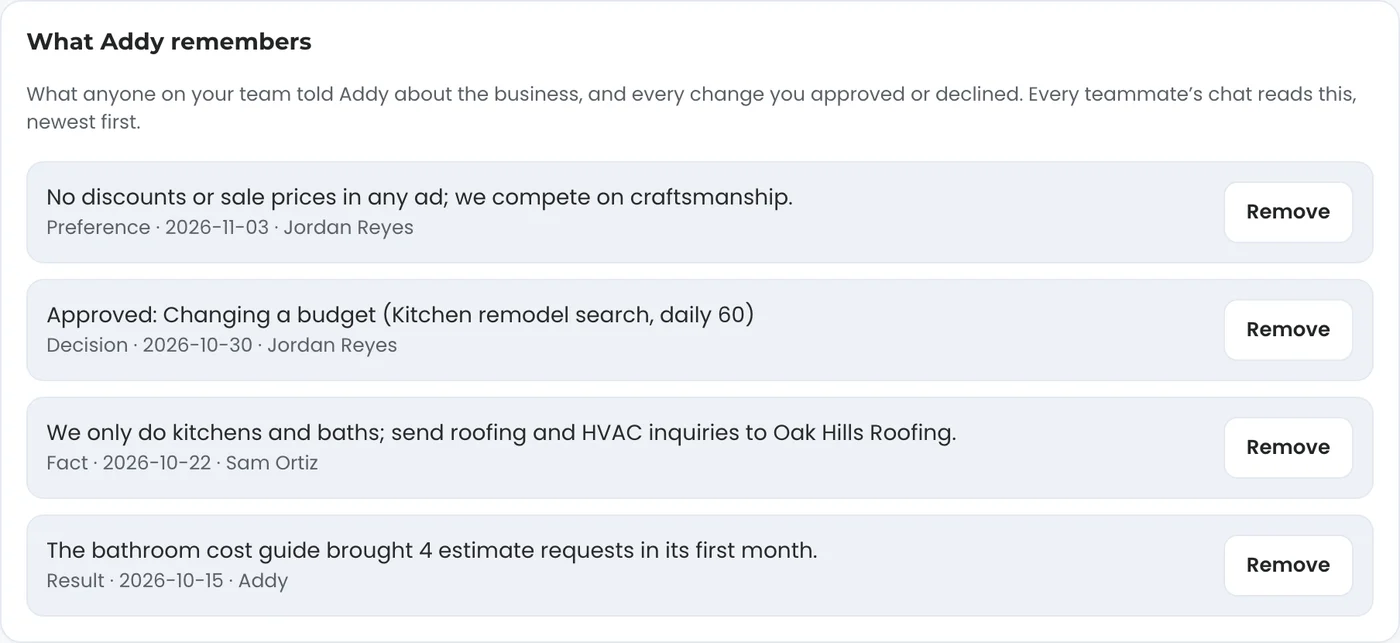
Open Settings and find What Addy remembers. It lists what the owner and admins told her about the business, and every change you approved or declined, newest first, each with its kind, the date and who said it.
#Remove something
The owner or an admin can press Remove on any line. Addy stops reading it right away. To change it, remove the old line and tell her the new version. A member who presses Remove sees Only the account's owner or an admin can change what Addy remembers.
#Your own conversation
Separately, Addy keeps each person's own conversation, so you can pick up where you left off: "do the same for the other campaign". Your teammates have their own conversations; what matters for the whole business goes in What Addy remembers.
#Questions
Does my teammate see my conversation?
No. Each person has their own conversation. What the owner or an admin tells Addy about the business is shared through What Addy remembers.
Where does she get the rest of what she knows?
From your dashboard numbers, your connected accounts and what you entered on Settings under About your business.
Related articles
Ask Addy in your dashboard. She answers from your own numbers, does the job for you, or opens a ticket for a person. Or email support@trulata.com and a person on our team replies.