

Marketing that runs without a marketing team. Only the decisions come to you.
The drafting, watching and counting run on a schedule whether anyone is at a desk, and on Command prospect sourcing does too. Any change to what you spend stays within the limits set for your engagement, and the screen shows you which is which.

Will this work with nobody on staff doing marketing?
Yes. It is built for that owner: a service business, with a territory or several locations, where the marketing sits on top of everything else. You answer the phone, quote the job and run the crew. Marketing happens at 9pm, when it happens at all. Your other options are a retainer with an agency you cannot see inside, a first marketing hire who leaves with what they knew, doing it yourself in the evenings, or buying shared leads from a marketplace.
TruLata is the fifth option. It splits marketing in two: work that runs on a schedule with nobody watching, and work that needs a person's judgement. The engines take the first kind. The second kind waits at a gate, and you or your team sit there. Already doing the marketing yourself? The page for the owner who is the marketing department covers the same system from that seat.
The other four
- An agency you cannot see inside
- A first hire who leaves with what they knew
- Your own 9pm
- Shared leads from a marketplace
The fifth option
- The engines take the scheduled work
- Judged work waits at a gate
- You or your team sit at the gate
What gets done while I am on a job?
The sourcing, the drafting, the watching and the counting. On Command, the outbound engine sources prospects every week to the target profile set with you, finds a deliverable address for each one or routes it to a contact-form path, and drafts an opener into a review-first queue. On Launch, Growth and Command, the content engine moves each topic through queued, researching, writing and draft. A topic passes a demand gate on real search volume and what already holds the result page. The research step cites current sources. The dedupe reads the titles already published on your site. Each piece is filed as a Google Doc in a Drive folder kept for your business, with its own featured image.
Every day at 7:05am Eastern, the ads change watch reads your Google Ads change history and user list, then separates our own writes and routine noise from material changes by anyone else, including the recommendations Google applies on its own. Every day at 7:20am Eastern, where your website forms feed the lead ledger, the lead watch runs five checks across that ledger, GA4 and Ads. Every night at 12:01am Central, a fallback snapshot bakes so there is always a page to open. Replies to outbound are classified as they arrive. On all tiers, your visibility across ChatGPT, Gemini, Claude and Grok is scored at baseline and re-run as the program moves.
Nobody on your payroll has to remember any of it. All of it keeps running while you are on a job.
Runs on its own
- Prospects sourced and draftedon Command
- Content researched and draftedon Launch, Growth and Command
- Ads change watchchange history and user list
- Lead watchfive checks, where your forms feed the ledger
- Fallback snapshotalways a page to open

All of it keeps running while you are on a job.
What still waits for a person?
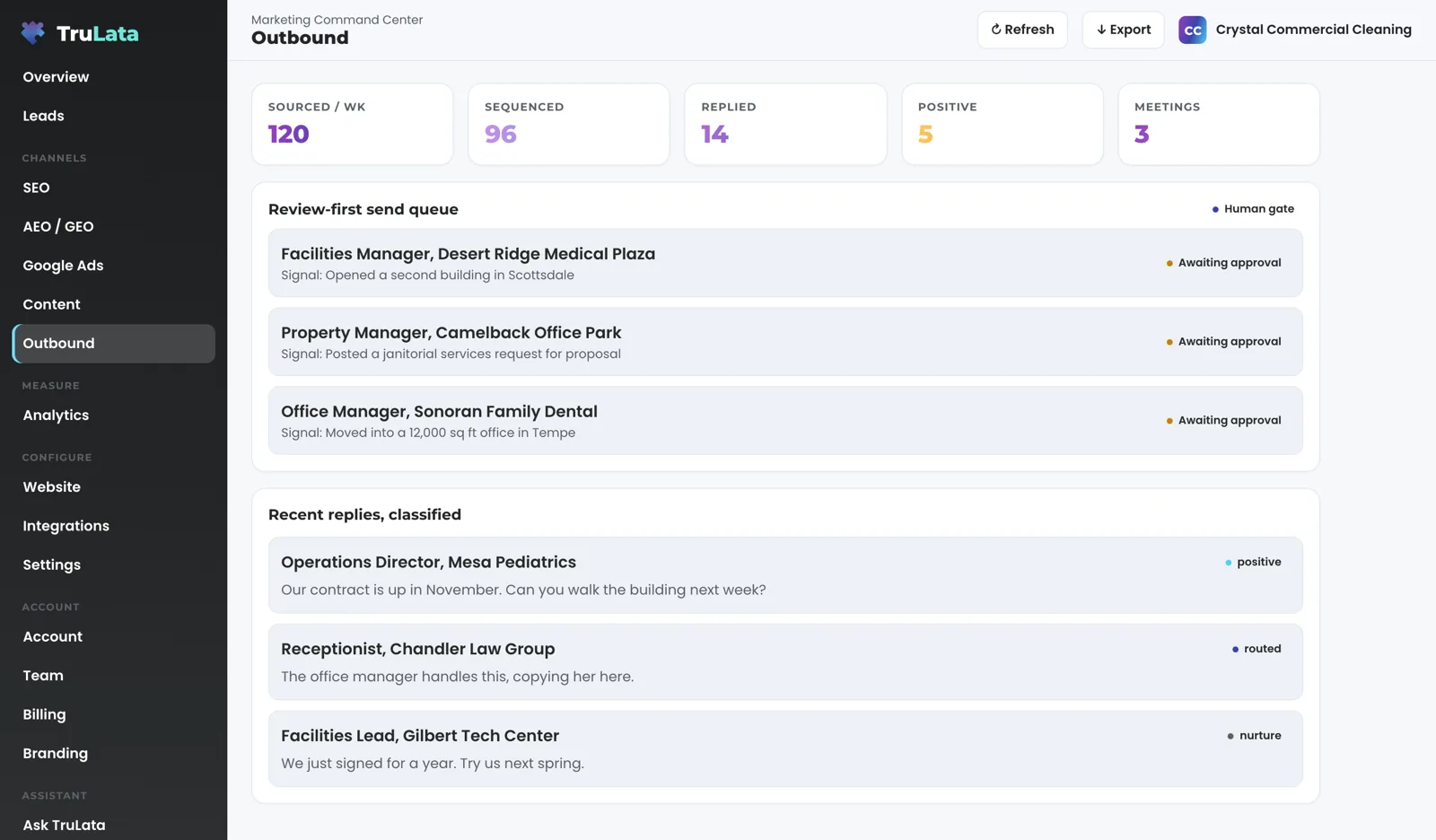
The judgement calls, with a record behind each. On Command, prospect emails leave from a review-first queue; a person releases them, or the queue releases on the schedule set for the engagement, and every send is logged. Follow-ups in a running sequence go out on a schedule and stop once a reply is recorded against the thread. Replies are classified and shown, and not-interested or bounced addresses are suppressed from further sends. With auto-publish off, a content piece waits as a draft until your team approves it; a content request from the screen asking for it to go out goes to the team and is logged. Auto-publish is a per-client setting. Ads, budgets and bids change within the limits set for your engagement, and the change watch records every change to the account, including the ones Google applies on its own. On all tiers our team runs the account.
Every click on the screen reads or requests. From the screen you can set a lead outcome, request a website change, or request a content, keyword, category or targeting change. Each request lands with your team and is logged. A request from the screen goes to your team as a logged ticket; the engine's writes to your ad accounts and your site go through their APIs and land in each account's own change history. The security page lists every write path.
What is left for me each week?
Three decisions, and each one is yours rather than a report to read. First, open the screen. It loads last night's snapshot instantly and pulls live numbers behind the request when that snapshot is older than five minutes. The header stamp says when the data was pulled: Google Ads and GA4 run hours behind, Search Console two to three days. The Refresh button starts a full pull and reloads the page when the stamp moves.
Second, decide. On Command, open the outbound view and read what is waiting in the queue. A person releases the drafts, or the queue releases them on the engagement's schedule, and on Command the person at the gate is on our team. Send a targeting change to the team from the Settings view. If a content piece is waiting as a draft, send a content request from the screen, which is logged, or let the per-client auto-publish setting put pieces out on the cadence. On Command, the queue and the publish decisions sit with our team; what each lead became is still yours to mark.
Third, set outcomes. When a lead lands in the Leads view, mark it Not a lead and choose why, and where follow-up tracking is on, mark contacted, quoted, won or lost from the same control. The outcome is written to the lead record and stays on the row. The count line says how many were marked not a lead, so the screen shows real work next to raw form submissions. Anything else you want changed, send to your team from inside the screen: a page on the website, a new topic, a keyword, a segment the outbound engine should source. You get a ticket number, and the Support view lists it.
- Open the screenIt refreshes because you opened it
- DecideRead the queue; send a targeting change to the team
- Set outcomesNot a lead with the reason, or contacted, quoted, won, lost
Nobody on your payroll has to remember any of it.
How much of setup is on me?
Only the access, and only once. Access comes first: add our Google account as a manager on your Analytics property, your Search Console site, your Ads account and your Business Profile listing. Each is an invitation you can revoke in your own console at any time. Our team connects your CRM, Stripe, your booking platform, ActiveCampaign and website forms from the inside, with the access you grant. Our team does the connecting, a connector we have not built yet is built during setup, and we never ask for your account passwords.
Then our part: the first pull, the answer-engine baseline, the keyword set and the ads watch on your account, plus on Command the outbound target profile, set with you. After that come the content cadence, the first ads reports, email flows and goals. A view stays off until its source is connected, and the Integrations view lists what is connected. The setup page walks through each week.
Your part, once
- Analytics property
- Search Console site
- Ads account
- Business Profile listing
- First pull
- Answer-engine baseline
- Keyword set
- Ads watch on your account
Which tier do I start on?
Start on the tier that carries the engines you want running. Starter is $400 a month, Launch $650, Growth $1,200, and Command is scoped per engagement. The pricing page lists what each tier includes, row by row.
Want a strategist and a plan without moving up a tier? Add the managed strategy retainer to any tier; it is scoped with you. Every tier is one flat number, month to month, and an annual commitment takes twenty percent off the monthly. The pricing page carries the same figures. If you want senior marketing judgement rather than a system, a fractional CMO engagement is the services counterpart.

Every job, and whose it is.
| The work | Who does it | When |
|---|---|---|
| Releasing a send | A person, or the queue on the engagement's schedule; our team on Command | Per draft; the record shows when it went |
| Content research and drafting | The engine | On your cadence, on Launch, Growth and Command |
| Publishing a piece | Your team, on a content request from the screen, or the per-client auto-publish setting | Per piece, or on the cadence |
| Ads change watch | The engine | Daily, 7:05am Eastern |
| Lead watch | The engine, where forms feed the ledger | Daily, 7:20am Eastern, five checks |
| Changing a budget or a bid | Within the limits set for your engagement; our team on all tiers | Read into the daily change record at 7:05am Eastern |
| Lead outcomes | You, from the Leads view | As leads land |
| Fallback snapshot | The engine | Nightly, 12:01am Central |
| Live numbers | The page, when you open it | Behind the request when the snapshot is older than 5 minutes |
The scheduled work runs whether anyone is at a desk; budget and bid changes stay within the limits set for your engagement, publishing waits for approval where auto-publish is off, and prospect emails leave from a review-first queue; and each of those is recorded.
Questions, answered.
Do I need to hire anyone to use it?
The engines research, draft, watch and count on a schedule, and on Command they source prospects too, so the seat you need is the one you already hold. A person reads the queue, approves drafts where auto-publish is off, sets lead outcomes and sends requests from the screen. On Command our team reads the queue and approves the drafts.
How much of my week does it take?
Only the decisions. Open the screen, read what is waiting, send any change you want to the team, and mark what each lead became. On Command that includes the outbound queue. Where auto-publish is off, a person on your team or ours approves each content draft; prospect emails leave from a review-first queue; a person releases them, or the queue releases on the schedule set for the engagement, and every send is logged. The report is assembled for you, every time you open the screen.
Will it send email or spend money while I am on a job?
Email can leave on the schedule set for the engagement, and ads run within the budget set for it. On Command, prospect emails leave from a review-first queue; a person releases them, or the queue releases on the schedule set for the engagement, and every send is logged. Follow-ups in a running sequence go out on a schedule and stop once a reply is recorded against the thread. Budget and bid changes stay within the limits set for your engagement, and the watch records every change to the account. Every click on the dashboard reads or requests; the engine's writes to Google Ads and your site go through their APIs, within those limits, and land in each account's own change history.
What happens if I do not open it for a week?
The scheduled work keeps running. The ads change watch runs at 7:05am Eastern, the lead watch at 7:20am Eastern where your forms feed the ledger, and the fallback snapshot at 12:01am Central. On Command the outbound queue releases its drafts on the schedule set for the engagement, or holds them for a person, and logs every send. When you open the page it loads the latest snapshot and pulls live numbers behind it.
Who releases the outbound sends if I do not have time?
A person, or the queue on the engagement's schedule, and the record shows when it went. On Command our team runs the program, so the release sits with our people rather than with you.
What do I have to set up myself?
Manager invitations on your Google accounts, during setup. Our team connects your CRM, Stripe, your booking platform, ActiveCampaign and forms from the inside with the access you grant. Our team does the connecting, and we never ask for your account passwords.
See it running
before you decide.
The demo is the real product on a fictional company, with your name and email in front of it. Pricing is three published tiers.
Open the live demo See pricing
New here? See what TruLata is. Prefer to write? Send us the one thing you want to know.
Start here: AI marketing platform · AI marketing software · all-in-one marketing platform · marketing automation software · marketing software for small business.
- Refreshed when you open itLive data on page load, never a monthly PDF
- Counted from your own formsLeads recorded server-side, compared daily with Ads and GA4
- Seen in AI answersHow often ChatGPT, Gemini, Claude and Grok name you, measured
- Every send loggedProspect emails leave from a review-first queue, and every send is logged.